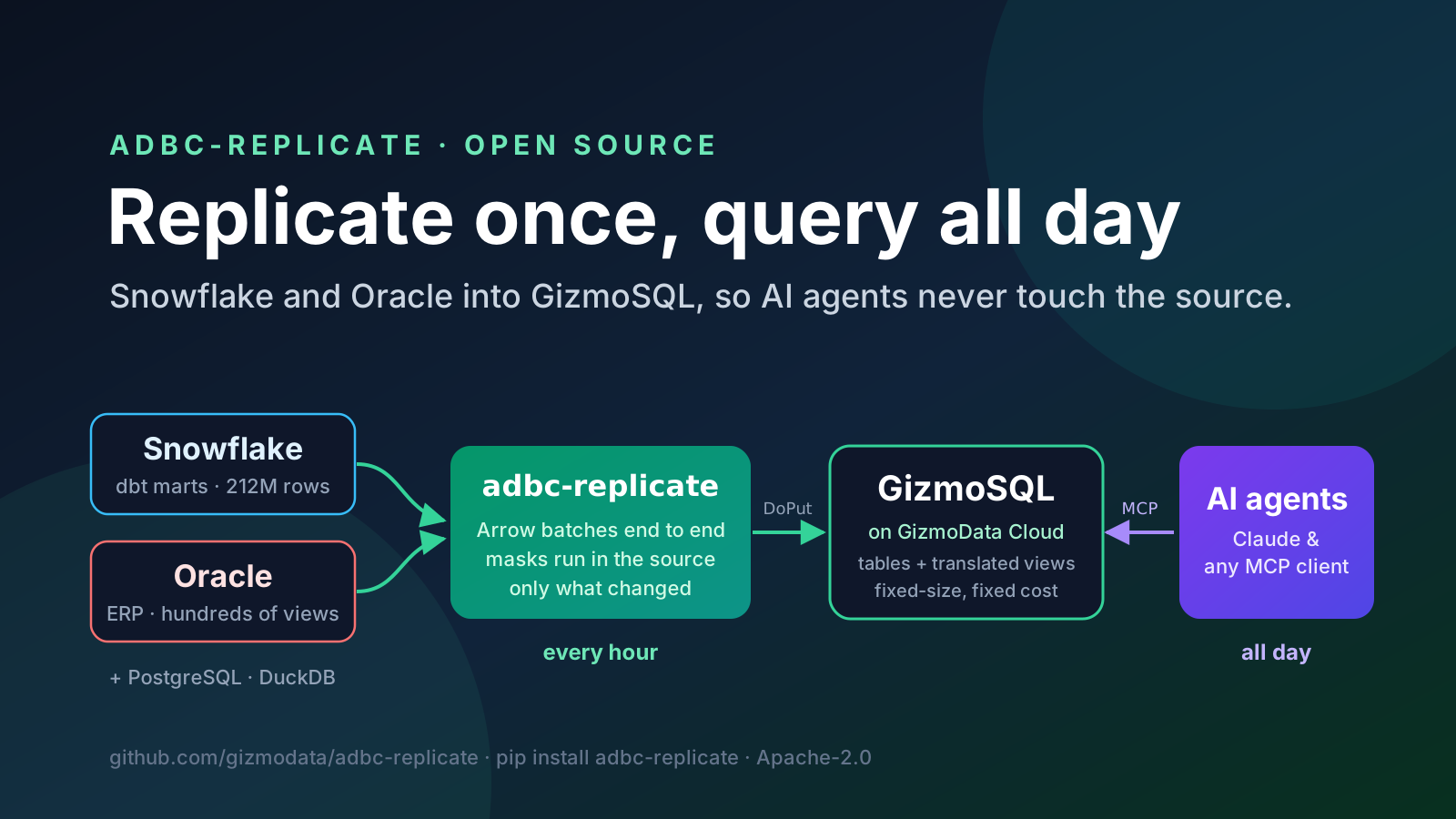
AI agents are chatty. To answer one question in plain English, Claude might list the tables, describe a few of them, try a query, fix it and run two more. Do that for a whole company, all day long, and you have a workload no data warehouse was priced for, hitting a database that was never meant to take it.
Two of our customers solved this the same way, from two very different sources. One keeps its data in Snowflake. The other, a manufacturer, runs its business on an Oracle ERP. Both now copy what their agents need into GizmoSQL on GizmoData Cloud every hour, and point their agents at the copy through the GizmoSQL MCP server. The tool doing the copying is adbc-replicate, which we've just released as open source (Apache-2.0). This post covers what it does, how both customers run it, and the real numbers from their run logs.
Why not let the agents query the source?
With Snowflake, the problem is the bill. A Snowflake warehouse bills per second while it runs, with a minimum of 60 seconds each time it starts. A dashboard that refreshes at 8 a.m. fits that model well. An agent answering questions whenever someone asks one doesn't: every question wakes the warehouse or keeps it awake, and the cost grows with how curious your people are. That's the opposite of what you want from a tool you hope everyone will use.
With Oracle, the problem is risk. The manufacturer's Oracle database runs the plant: orders, inventory, shop jobs, the general ledger. Exploratory analytical SQL written by a language model doesn't belong on that machine during a shift. Oracle's SQL dialect also isn't what most tools (and most models) write best.
Replication fixes both. The source sees one scheduled job an hour, and the agents get a DuckDB engine of their own: GizmoSQL on a cluster of a size you choose, which costs the same whether the agents ask ten questions a day or ten thousand.
What adbc-replicate does
You describe what to replicate in a YAML file, and adbc-replicate does the rest. Underneath, it's one Arrow stream from the source database to GizmoSQL (more on that in the next section).
- Sources: Oracle (through our ADBC driver for Oracle, so no Oracle Client install), Snowflake, PostgreSQL and DuckDB. Targets: GizmoSQL and DuckDB.
- Choose objects by pattern: pick schemas, tables and views with globs (
SALES_*) or regular expressions, with excludes and renamed target schemas. You can also copy a view's rows as a table. - Masks run inside the source. Columns can be excluded, or masked with
null, a salted hash, a fixed value or any SQL expression. The mask is part of theSELECTthat runs in the source database, so raw values never cross the network. A mask rule that matches no column stops the run, because a typo there could leak a column. - Consistent snapshots: every table can be read as of the same moment: an Oracle SCN, a PostgreSQL exported snapshot, or a Snowflake time-travel timestamp. Foreign keys line up.
- Copy only what changed: a metadata check where the source has one (Snowflake's
LAST_ALTERED), otherwise a row count plus a content fingerprint computed in the source. Incremental merges on the primary key use Oracle'sORA_ROWSCN, or a watermark column such as dbt'sDBT_RUN_STARTED_AT. - Views come along, translated to DuckDB SQL, pointed at the replicated tables and created in dependency order. More on that below, because it's the hard part.
- Atomic and observable: each table is swapped in inside a transaction, so readers never see a half-loaded table. Every run is logged in SQL tables next to the data, and a Slack (or any) webhook reports each run.
- Runs anywhere:
pip install adbc-replicate, a container image, or a Helm chart that runs it as a Kubernetes CronJob.
The power of ADBC: one Arrow stream, source to target
Most replication tools are built on row-oriented APIs. They fetch rows through ODBC or JDBC, convert every value into the tool's own representation, and then either INSERT them in batches or write CSV or Parquet files to a bucket and run a COPY. Every hop costs CPU and memory, and the staging bucket is one more thing to secure and clean up.
ADBC (Arrow Database Connectivity) is the Apache Arrow project's database API, and in ADBC a query result is an Arrow stream. That changes the shape of the whole job. Stripped to its core, a copy is this:
1import adbc_driver_gizmosql.dbapi as gizmosql
2import adbc_driver_postgresql.dbapi as postgresql
3
4with postgresql.connect(uri="postgresql://postgres:postgres@127.0.0.1:5439/postgres") as source, \
5     gizmosql.connect(uri="gizmosql://127.0.0.1:31349?transport=tcp",
6                      username="gizmosql", password="gizmosql") as target:
7    with source.cursor() as src, target.cursor() as dst:
8        src.execute(operation="SELECT id, amount, ordered_at FROM orders")
9        reader = src.fetch_record_batch()   # a lazy stream of Arrow record batches
10        rows = dst.adbc_ingest(table_name="orders", data=reader, mode="replace")
11    target.commit()
12    print(f"{rows:,} rows streamed")
We ran exactly that against a million-row PostgreSQL table while writing this post. It printed 1,000,000 rows streamed, and the Python process peaked at about 155 MB, most of it the interpreter and the drivers. Nothing in it ever holds the whole table, because fetch_record_batch() returns a RecordBatchReader, a stream that the target pulls from one batch at a time. On GizmoSQL, adbc_ingest is a single Flight SQL DoPut: one gRPC stream of Arrow batches that the server feeds straight into DuckDB with an Arrow scan. Data stays columnar from the source driver to DuckDB's storage, and Python never touches an individual row.
adbc-replicate keeps that pipeline and adds what a real copy needs, as streaming steps that each hold at most one batch:
- Renaming: columns get their target names (lower-cased by default), including any you renamed.
- Type fixes per source: source-specific Arrow extension types are reduced to plain Arrow types. Where a driver returns something lossy, the value is read exactly instead: the PostgreSQL driver hands over
numericas text (our million-row test table landed asVARCHAR), so adbc-replicate turns it back intoDECIMAL(p,s), and Oracle's unconstrainedNUMBERis read asDECIMAL(38,10)rather than a lossy double. - Coalescing: small source batches are combined up to 65,536 rows or 12 MiB before they're sent, which keeps GizmoSQL's insert buffers full.
- Atomic swaps: the ingest runs inside a transaction, so readers keep seeing the old table until the new one commits.
The drivers do the rest. Our Oracle driver is written in Go and decodes Oracle's wire protocol directly into Arrow, with no Oracle Client to install. Snowflake's ADBC driver downloads result chunks from Snowflake's cloud storage in parallel, and adbc-replicate caps its prefetch queue so memory stays flat on huge results. Every source goes through the same code path, so adding one means adding a driver and a source module of a couple hundred lines, not a new pipeline. In the project's own measurements, a 2-million-row Oracle table copied at about 500,000 rows per second on a laptop, with client memory peaking at about 250 MB. (For more on the drivers, see the GizmoData ADBC driver suite and Flight SQL bulk ingestion.)
The Snowflake customer: GizmoData Cloud at Customer
Our Snowflake customer runs GizmoData Cloud at Customer in its own cloud account. adbc-replicate runs there too, as a CronJob from the Helm chart on the customer's Kubernetes cluster, every hour at half past, just after the dbt runs that land on the hour. It copies two dbt schemas in full, plus the staging tables that some of their views need: hundreds of tables and views. Personal data (government ID numbers, birth dates, employees' personal contact details) is masked to NULL inside Snowflake before anything leaves it.
The config is short. This is its shape, with the names changed:
version: 1
name: snowflake-to-gizmosql

source:
  type: snowflake
  options:
    username: REPLICATOR
    adbc.snowflake.sql.account: ${SNOWFLAKE_ACCOUNT}
    adbc.snowflake.sql.warehouse: REPLICATOR_WH
    adbc.snowflake.sql.db: ANALYTICS
    adbc.snowflake.sql.auth_type: auth_jwt
    adbc.snowflake.sql.client_option.jwt_private_key_pkcs8_value: ${SNOWFLAKE_PRIVATE_KEY}

target:
  type: gizmosql
  uri: gizmosql://analytics.example.com:31337
  username: ${GIZMOSQL_USERNAME}
  password: ${GIZMOSQL_PASSWORD}

objects:
  - db_schemas: [MARTS, CORE]          # every table and view in both

columns:
  - tables: ["*"]
    mask:
      SSN: "null"                      # masked inside Snowflake
      DATE_OF_BIRTH: "null"
    fingerprint_ignore: [DBT_INVOCATION_ID, DBT_RUN_STARTED_AT]

refresh:
  mode: incremental                    # merge only the rows dbt stamped since the last run
  watermark_column: DBT_RUN_STARTED_AT
  detect_deletes: false

notifications:
  - url: ${SLACK_WEBHOOK_URL}
    when: [failure, view_errors, success]
The incremental mode matters most for the biggest tables. A dbt incremental model with tens of millions of rows may gain a few thousand rows a day, and that's all that moves: the rows dbt stamped since the last run, merged on the key. A table dbt rebuilds whole is skipped when its fingerprint hasn't changed, and the fingerprint ignores dbt's run-metadata columns, so rebuilding a model with the same content copies nothing. After every merge, the row count must match Snowflake's. If it doesn't, the table is copied whole instead.
adbc-replicate grew out of the hand-written loader we first built for this customer. Their deployment now consists of one YAML file and the Helm values.
The Oracle customer: GizmoData Cloud
The manufacturer uses GizmoData Cloud (our hosted service). adbc-replicate runs hourly on a server in their own network and pushes into their cluster. Every run reads the whole schema as of one Oracle SCN, so a parts table and the orders that reference it always come from the same moment.
version: 1
name: erp-to-gizmosql

source:
  type: oracle                         # no Oracle Client needed
  uri: oracle://erp-db.example.com:1521/PROD
  username: ${ORACLE_USERNAME}
  password: ${ORACLE_PASSWORD}
  consistency: snapshot                # every table read at one SCN

target:
  type: gizmosql
  uri: gizmosql://erp.example.com:31337
  username: ${GIZMOSQL_USERNAME}
  password: ${GIZMOSQL_PASSWORD}

objects:
  - db_schemas: [ERP]
    exclude_tables: ["*_BAK", "/^TMP_/"]

views:
  source_time_zone: America/New_York   # what SYSDATE means on the source

parallelism: 4
Like most long-lived ERPs, theirs carries hundreds of views: years of business logic written in Oracle SQL. Those views are what make the replica useful to an agent. An agent asking about late orders should use the definition of "late" the business already trusts, not reinvent it from raw tables.
The numbers, from the run logs
Every run posts a summary to a Slack channel. These figures come straight from those messages, from each customer's first full copy (October 14 for the Oracle customer, October 15 for the Snowflake customer) to the morning of October 16, 2026:
Snowflake customer
Snowflake → GizmoData Cloud at Customer
- Replicated
- Over 200 tables, over 100 views
- First full copy
- 212.0 million rows in 31 min 19 s
- Schedule
- Hourly, after the dbt runs
- A quiet hour
- Nothing copied, 2–4 min
- A typical hour
- 1–64 tables, up to 2.5 million rows, 2–7 min
- Largest hourly run
- 41 tables, 44.6 million rows in 18 min 22 s
- Failed runs
- None (the first two flagged two views; see below)
Oracle customer
Oracle → GizmoData Cloud
- Replicated
- Over 150 tables, hundreds of views
- First full copy
- 16.1 million rows in 1 h 10 min (a wider first scope of about 500 tables)
- Schedule
- Hourly, at one Oracle SCN
- A quiet hour
- Nothing copied, about 4½ min
- A typical hour
- 1–5 tables, up to 170,000 rows, 4–5 min
- Largest hourly run
- 5 tables, 169,122 rows in 4 min 37 s
- Failed runs
- None (early runs flagged untranslated views; see below)
On a quiet hour, no table data crosses the network. adbc-replicate asks the source whether each table changed (Snowflake's LAST_ALTERED metadata first, then a fingerprint computed inside the database; for Oracle, the fingerprint) and copies only the tables that did. This is what the hourly messages look like:
Two real hourly runs from October 16, 2026, redrawn from our Slack channel (names changed; run IDs, host names and some counts left out).
Then the agents get to work
On the other side of the copy, both customers use the GizmoSQL MCP server. The Snowflake customer runs it as a remote connector in their own cloud account, so employees use it from Claude on the web, on the desktop and on their phones. They sign in with their Microsoft work accounts, and the server queries GizmoSQL with a read-only service account. The manufacturer's team points the same MCP server at its GizmoData Cloud cluster.
The MCP server is read-only by default, enforces row caps and query timeouts on the server, and keeps credentials out of tool output. GizmoSQL's own permissions decide what an agent can see, and the masked columns were never copied in the first place.
For the Snowflake customer, the result is predictable cost. Snowflake does the replication work once an hour for a few minutes, and the agents' questions never touch it, however many people ask them. The GizmoSQL cluster that answers them has a fixed size and a fixed price. For the manufacturer, the ERP keeps running the plant, and the people asking questions get DuckDB speed on a consistent copy that's at most an hour old.
Translating views: the hard part
Copying tables is mostly plumbing. Translating views is where a replication tool can quietly give you wrong answers, and we learned that on the manufacturer's real Oracle schema. adbc-replicate builds on sqlglot, an excellent SQL transpiler. But a transpiler that can't express something in the target dialect may produce SQL that runs and means something different. A few examples we hit:
- Oracle's
(+)outer joins can come out as inner joins: the view runs and silently returns fewer rows. TO_CHAR(dt, 'YYYY-MM')can lose its format and become a plain cast to text.CAST(x AS DATE)keeps the time of day in Oracle and drops it in DuckDB.SYSDATEis the source server's wall-clock time. Translated as "now" in UTC, every "today" and aging view was off by four or five hours.- NULL in string concatenation: Oracle treats NULL as an empty string in
||, while DuckDB returns NULL. Numbers also print differently (1.50is1.5in Oracle).
So adbc-replicate never lets a translation fail silently. A construct it can't translate faithfully is reported, never quietly changed. Each Oracle rewrite (hierarchical CONNECT BY queries to WITH RECURSIVE, ROWNUM, INSTR with an occurrence, TO_CHAR formats, Oracle's string and date semantics) is checked value by value against a real Oracle database in the integration tests. Whatever is left can go through config: PL/SQL functions rewritten as DuckDB SQL, hand-written overrides, or "copy this view's rows instead".
The first full run against that schema, on October 14, reported more than a quarter of its views as impossible to translate faithfully. A day and four releases later, the hourly run creates every view in its scope, and none fails. The only two failures in the Snowflake customer's first run turned out to be views that fail in Snowflake itself; they're now excluded.
One more lesson, on masking. Masking a column can empty a view that joins on it: a NULL key matches nothing. If a view joins a lookup table on a sensitive ID, mask the lookup's label instead of the key, and compare the view's row count with the source after any masking change.
Try it in five minutes
Install it with the drivers you need, then let it write a starter config:
pip install "adbc-replicate[snowflake,gizmosql]"   # or oracle, postgresql, duckdb, all

adbc-replicate init replicate.yaml          # a starter config to edit
adbc-replicate test-connection --config replicate.yaml
adbc-replicate plan --config replicate.yaml # what would be copied, masked and translated
adbc-replicate run --config replicate.yaml
plan connects only to the source and shows every table, every excluded and masked column, and whether each view translates, before anything is written. Run run a second time and unchanged tables are skipped:
⏭️  shop.customers: unchanged (fingerprint, 1,000 rows)
⏭️  shop.orders: unchanged (fingerprint, 100,000 rows)
📊 Tables: 0 copied (0 rows), 2 unchanged, 0 failed in 0.0s
🪟 Views: 0 created, 1 unchanged, 0 failed
The README's quick start runs the whole thing locally with two Docker containers (PostgreSQL into GizmoSQL), and documents every config option, the Helm chart, and the Oracle and Snowflake specifics. The output above is from our own run of it while writing this post.
One honest trade-off: agents see the data as of the last run. For the questions people ask an AI assistant ("how did service sales do last week?", "which parts are below their reorder point?"), an hour is plenty, and the source stays the system of record. If you need sub-minute freshness, run it more often, or keep that workload on the source.
Give your agents their own engine
Replicate into GizmoData Cloud
Start free with $25 of launch credit, applied automatically. No credit card needed. Create a GizmoSQL cluster, point adbc-replicate at it, and connect Claude through the MCP server. If you'd rather keep everything in your own cloud account, that's GizmoData Cloud at Customer.