GizmoData Cloud
The fully managed analytical SQL platform, at a fraction of the cost of a cloud data warehouse.
Launch a cluster in minutes on the latest Arm compute in AWS, Google Cloud or Azure, connect the tools you already use, and pay by the hour for what you run. Built on DuckDB, and open source at its core.
Start free with $25 of launch credit, applied automatically. No credit card needed — details below.
- Plans from $29/month, and the monthly fee comes back in full as compute credit
- TPC-H 1 TB in 80 seconds, about $0.34 on GizmoData Cloud
- Runs in AWS, Google Cloud or Azure, or in your own cloud account
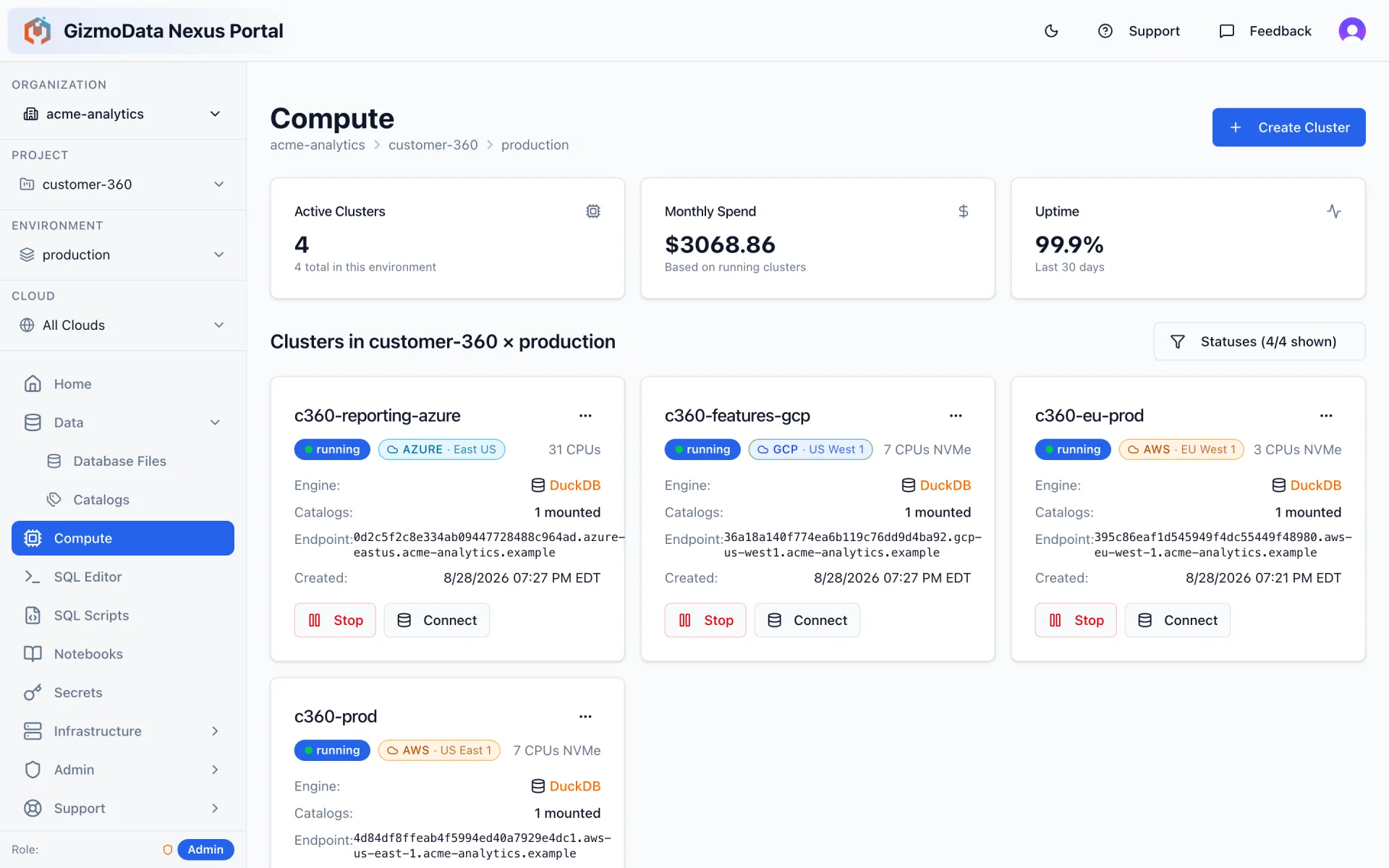
One production environment, three GizmoSQL clusters, three clouds — Google Cloud, AWS and Azure — managed side by side.
The latest compute for your data workload
DuckDB runs each query on a single node, so every new processor generation is a straight speed-up for your queries. GizmoData Cloud runs on the newest Arm chips each cloud offers — including AWS Graviton 5 — in memory-optimized shapes with local NVMe SSD, and adds new generations as they ship.
Graviton 5
AWS · r9gd
AWS’s newest Arm processor, generally available since August 2026. It ran the full TPC-H 1 TB benchmark in 80 seconds on a single r9gd.24xlarge — 10% faster than Graviton 4.
Graviton 4
AWS · r8gd
The previous flagship Graviton: memory-optimized, with local NVMe SSD. Choose it or Graviton 5 per cluster.

Axion
Google Cloud · C4A
Google’s custom Arm processor. C4A shapes from 4 vCPUs up carry local SSD for DuckDB’s spill and scratch space; 1–2 vCPU shapes cover light workloads.

Cobalt 100
Microsoft Azure · Epdsv6
Microsoft’s custom Arm processor, in the memory-optimized Epdsv6 shapes with local NVMe.
Pick the generation and size per cluster; the hourly price is shown before you create it, and a newer generation simply costs what its machines cost.
See the TPC-H 1 TB benchmark: Graviton 5 vs. Graviton 4 vs. Cobalt 100The data plane goes where your data is. The control plane stays in one place.
Most “multi-cloud” platforms mean one deployment per cloud, each with its own console. GizmoData Cloud runs a single control plane that manages Kubernetes data planes in AWS, Google Cloud and Azure at the same time — so a project can have its EU clusters in Ireland, its ML feature store next to GCS in Oregon, and its finance reporting on Azure, and you administer all of it from one organization with one set of roles.
Amazon Web Services
AWS
EKS data planes on Graviton 5 (r9gd) and Graviton 4 (r8gd) NVMe shapes, S3-backed DuckLake, NLB-terminated TLS.
Google Cloud
GCP
GKE data planes on Axion (C4A) local-SSD shapes, GCS-backed DuckLake, per-cloud tuning profiles.
Microsoft Azure
Azure
AKS data planes on Cobalt (Epdsv6) NVMe shapes, Azure Blob / ADLS-backed DuckLake, and Azure Marketplace billing on the roadmap.
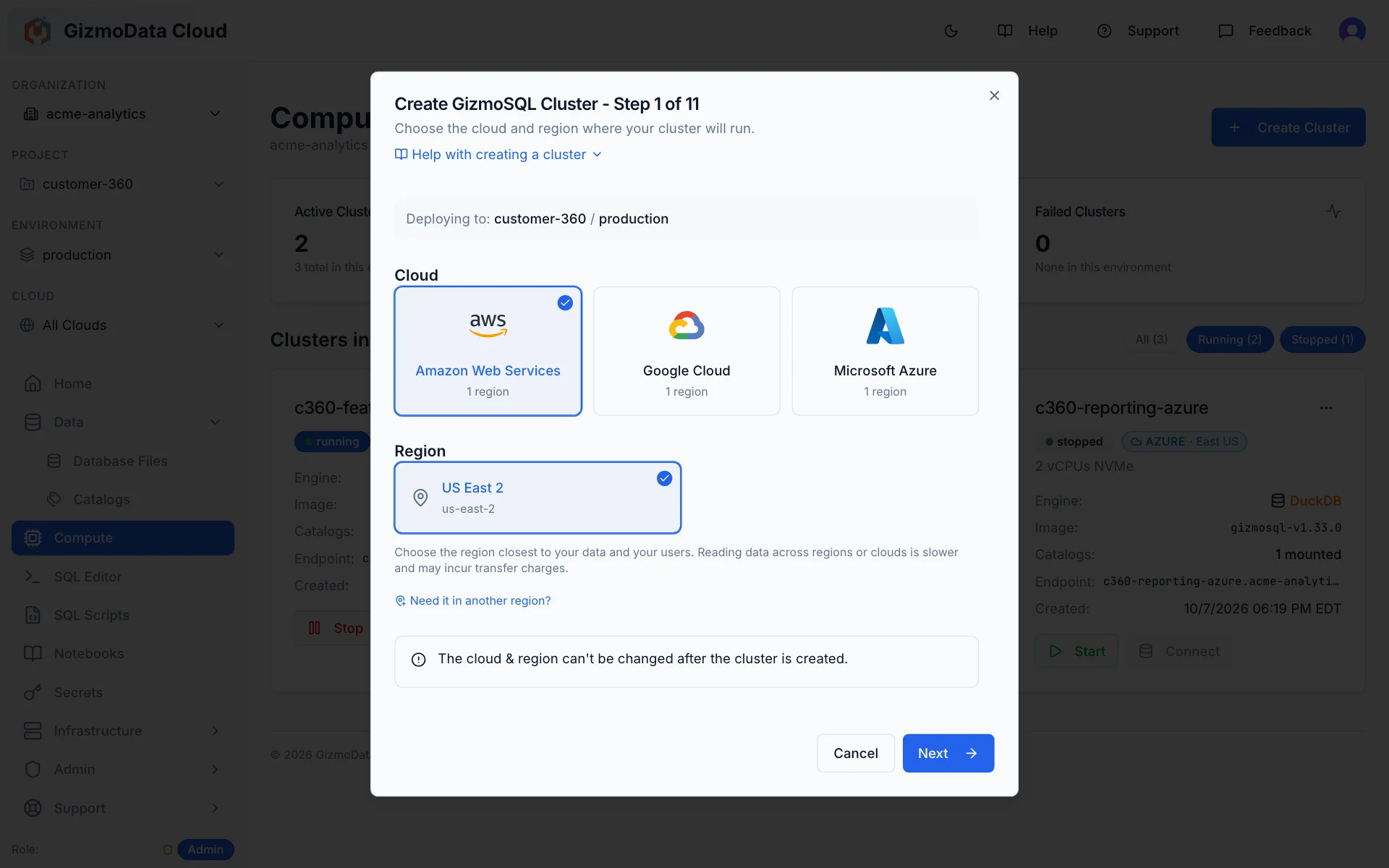
Region-aware placement
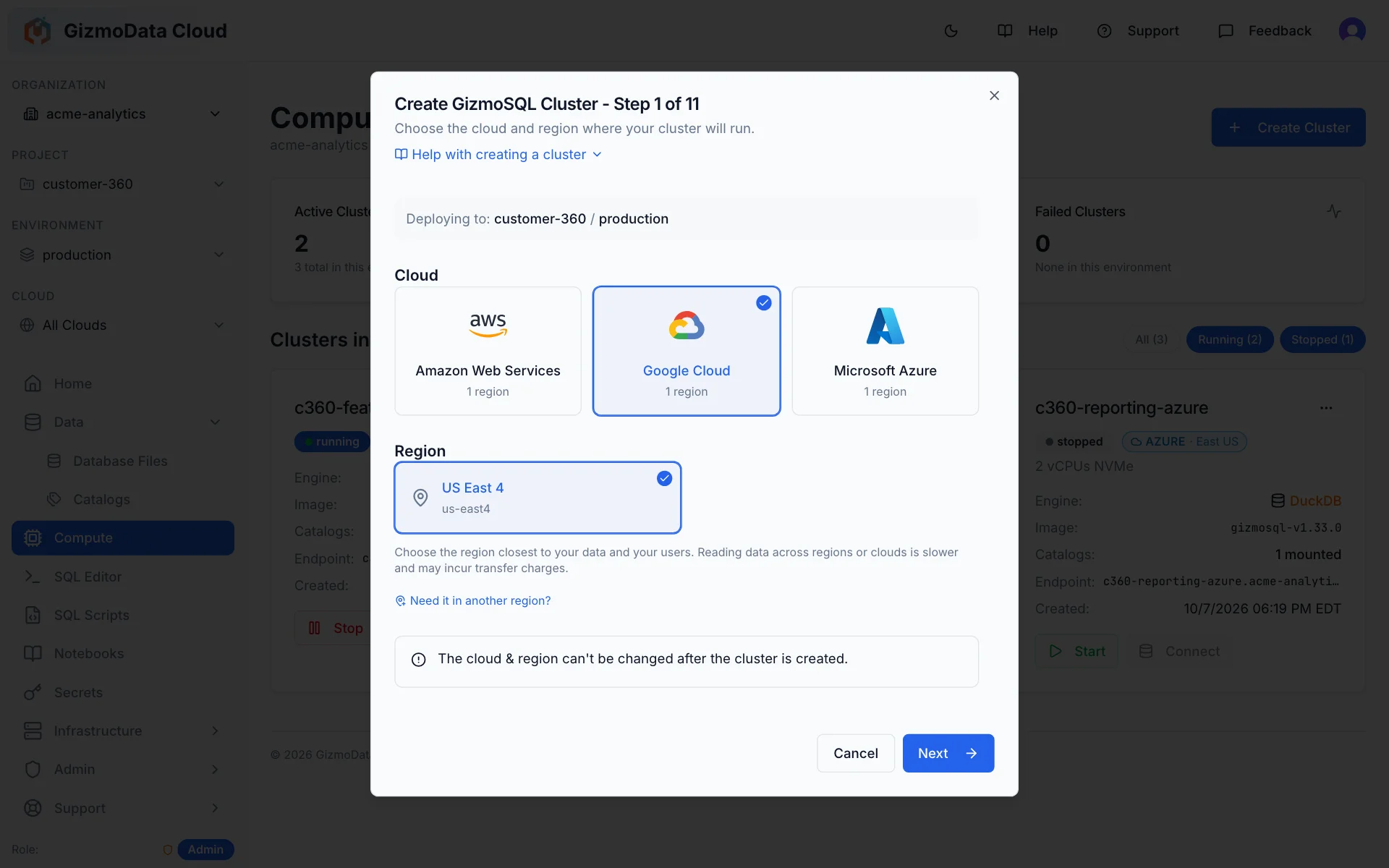
Catalogs, secrets and firewall rules can all be qualified by cloud and region. When a cluster is created, defaults resolve to the nearest matching region up the scope chain — exact region first, then cloud-wide, then neutral.
Egress governance, built in
Turn on cross-region mount governance and the platform refuses to attach a catalog whose data lives in a different region from the compute — the exact error tells you which region each side is in. No surprise inter-region bills.
Shapes that match the cloud
Instance sizes are cloud-specific (Graviton 5 r9gd and Graviton 4 r8gd on AWS, Axion C4A on GCP, Cobalt 100 Epdsv6 on Azure) and validated against the cloud you picked, so you cannot accidentally ask AWS for an Azure shape.
Where GizmoData Cloud runs today
Self-serve organizations can launch clusters in these regions right now.
- AWSUS East (Ohio)
us-east-2 - Google CloudUS East (Northern Virginia)
us-east4 - Microsoft AzureEast US 2 (Virginia)
eastus2
Provision GizmoSQL clusters in any cloud, from one screen
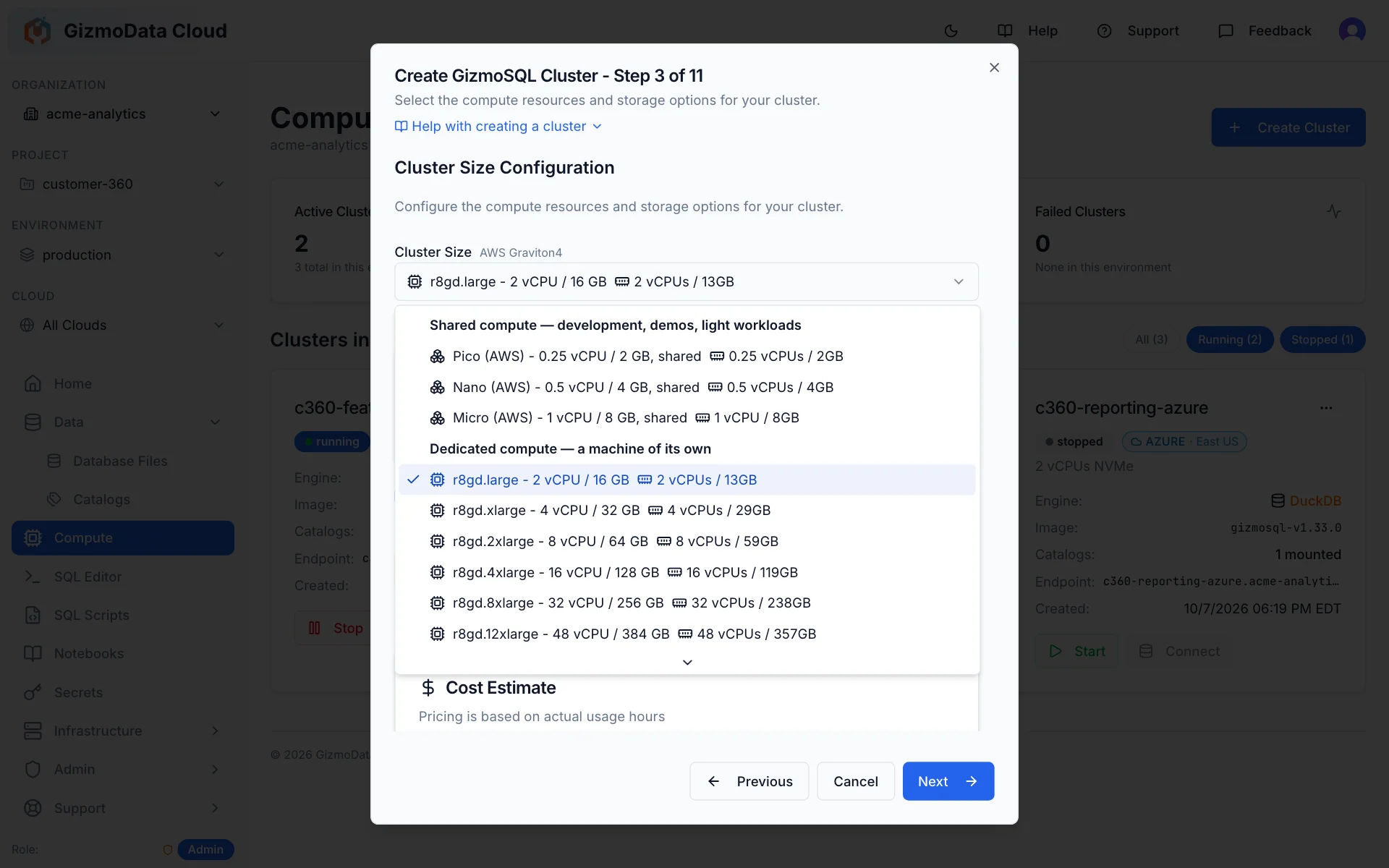
Every cluster is a fully managed GizmoSQL deployment — DuckDB behind Apache Arrow Flight SQL — on Kubernetes in the cloud and region you choose. Pick an instance shape, mount your catalogs and secrets, and it is serving queries in minutes.
- Instance shapes per cloud: AWS Graviton 5 (r9gd) and Graviton 4 (r8gd), Google Axion (C4A), Azure Cobalt 100 (Epdsv6) — picked from a live, priced menu
- Shared compute for development, demos and light workloads — Pico (0.25 vCPU / 2 GB), Nano (0.5 vCPU / 4 GB) and Micro (1 vCPU / 8 GB), from $0.028/hour — next to dedicated machines for production
- Autoscaling (min/max replicas, CPU & memory targets) plus calendar-based autoscaling schedules
- Core or Enterprise license editions; instrumentation & query-log catalogs; OAuth/SSO; read-only and lockdown modes
- Start, stop, edit and auto-terminate idle clusters — with the cost shown before you commit
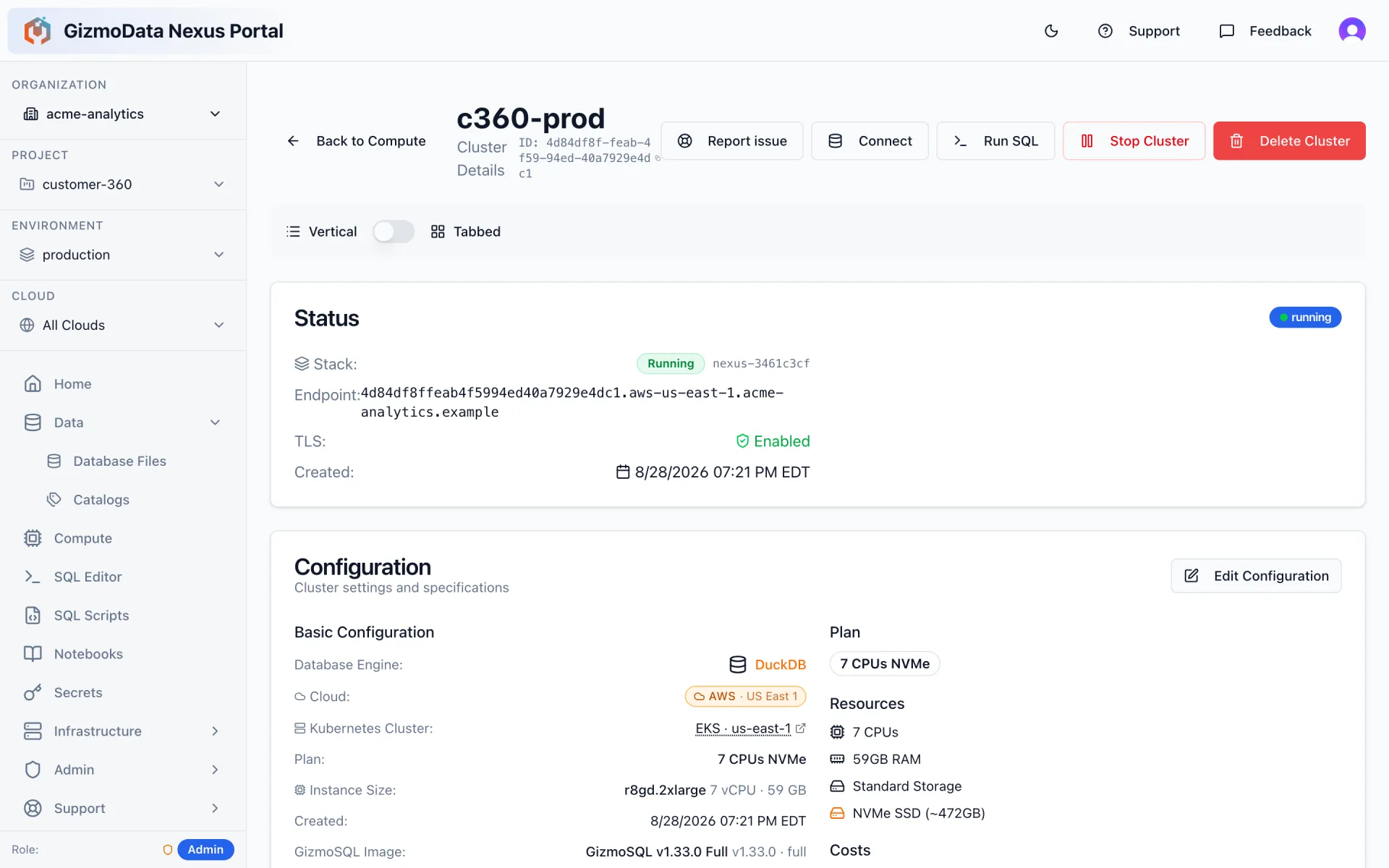
Lakehouse catalogs that follow your data — not the other way round
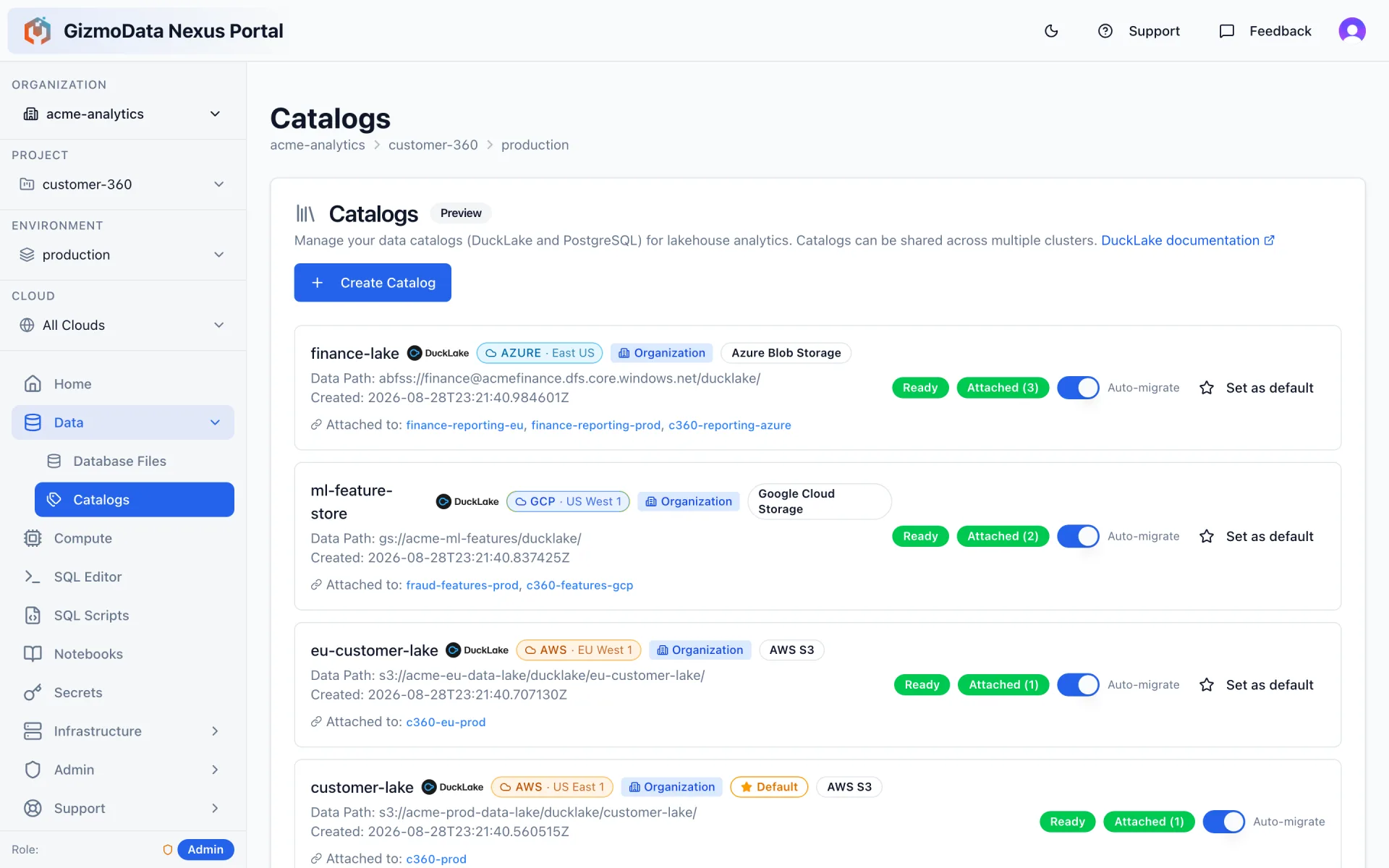
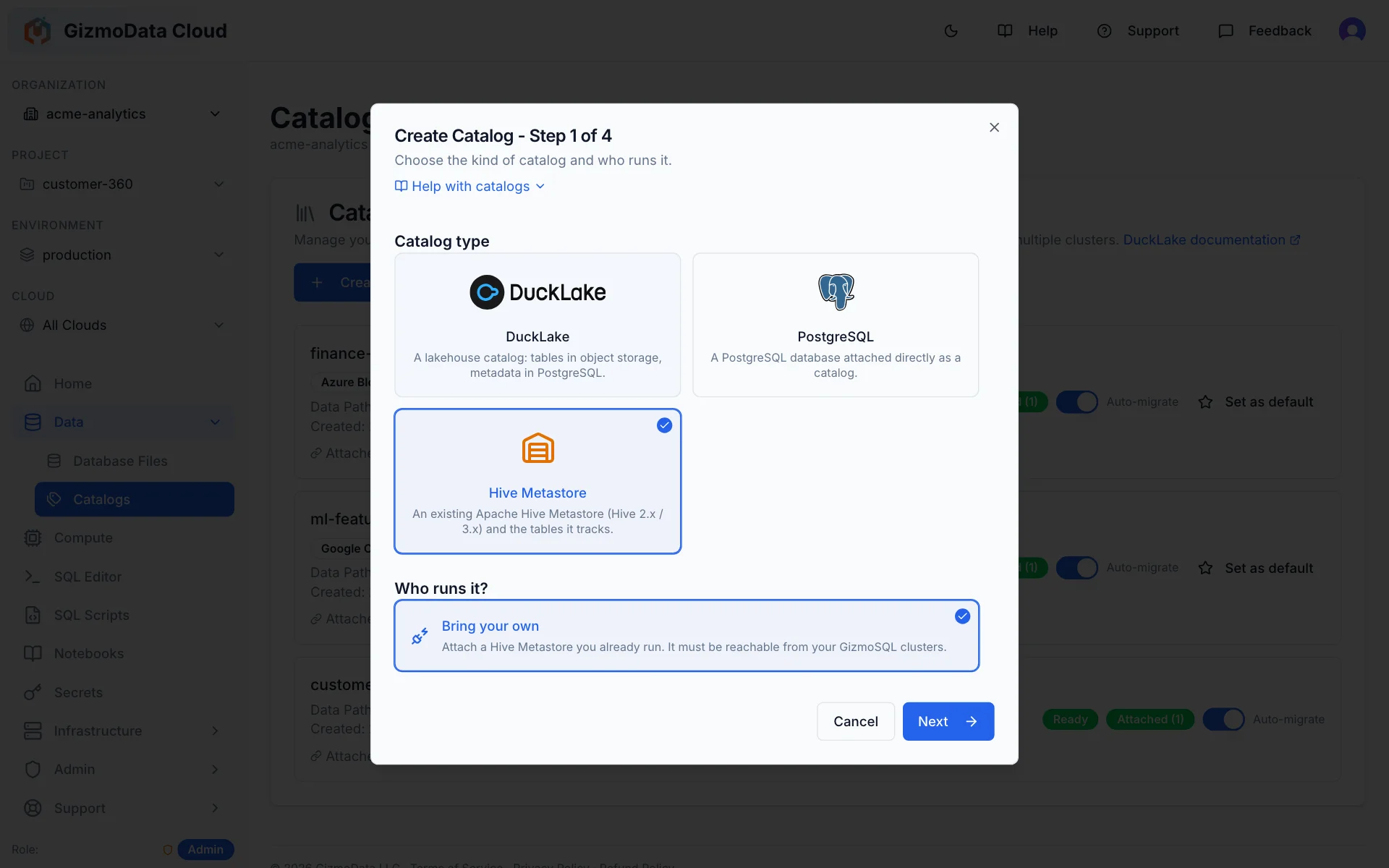
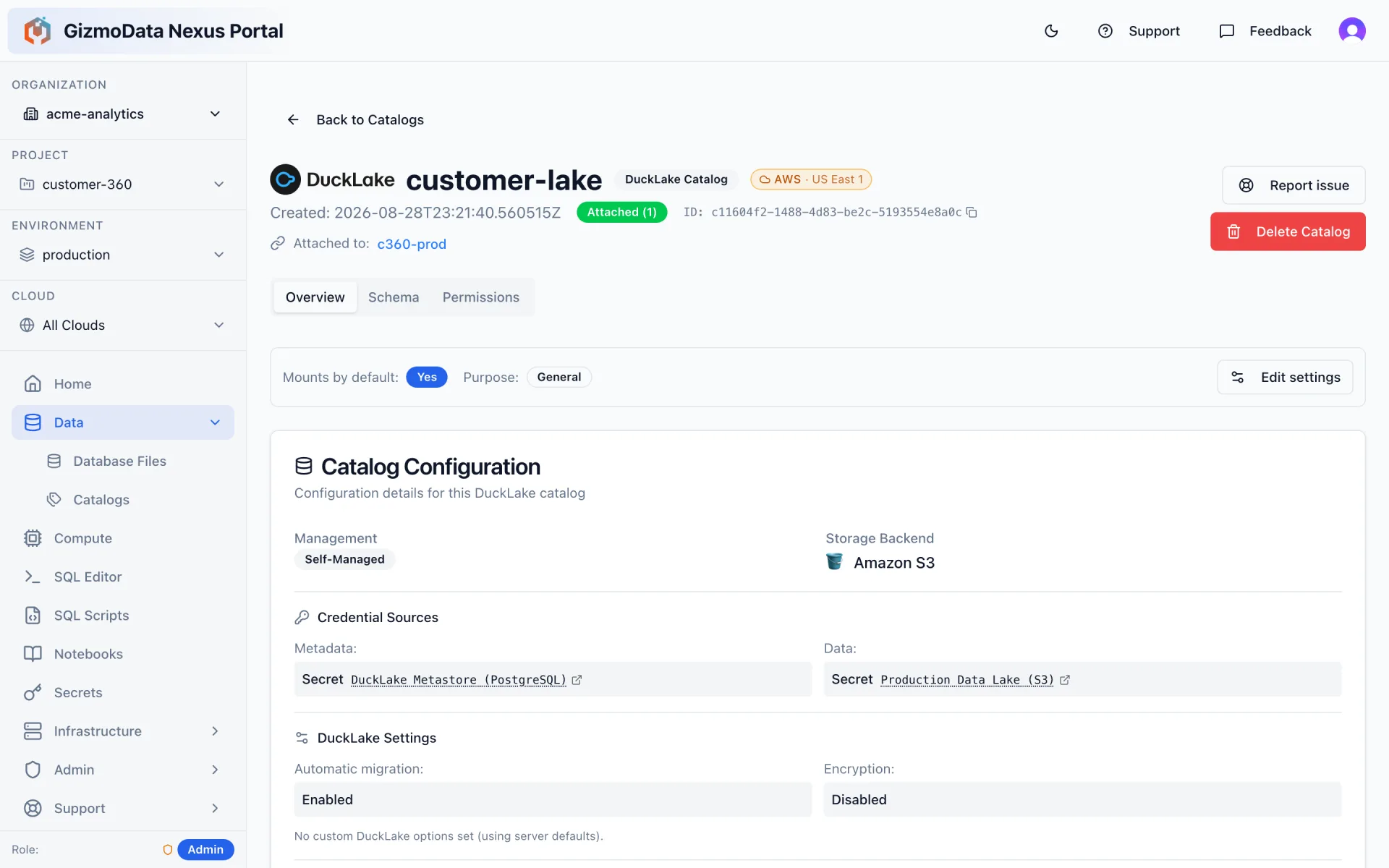
A catalog is a DuckLake (or PostgreSQL) metastore plus the object storage that holds its Parquet data — or a Hive Metastore you already run. Register one and mount it to as many clusters as you like; GizmoData Cloud keeps track of which clusters have it attached, migrates it automatically, and can set it as the default for a whole scope.
- DuckLake catalogs on S3, GCS, Azure Blob/ADLS or Cloudflare R2 — with a PostgreSQL metastore you bring or we manage
- Bring your own Hive Metastore (Hive 2.x / 3.x): attach it by its Thrift address and query the tables it tracks in S3, GCS or Azure — or create new ones in its warehouse location
- Region-aware: each catalog knows the cloud and region its data lives in, so compute can be placed next to it
- Cross-region mount governance: organizations can block mounting a catalog from a different region, so you never pay surprise egress
- Schema browser and refresh without spinning up compute; per-catalog access rules; encrypted catalogs; history retention for instrumentation catalogs
Credentials stored once, mounted everywhere they belong
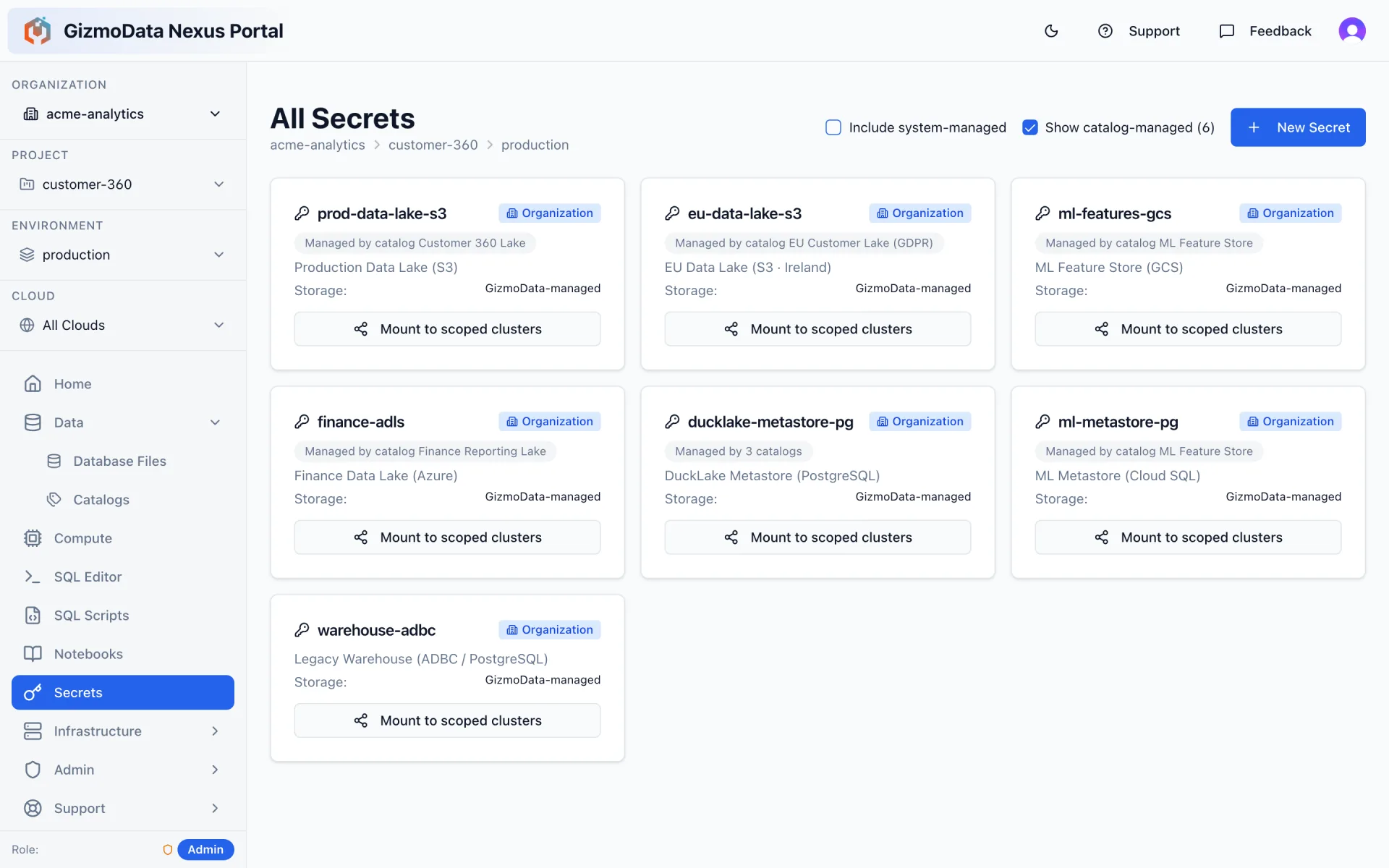
S3, GCS, Azure Storage, PostgreSQL and ADBC credentials are encrypted at rest in the control plane and injected into GizmoSQL pods as DuckDB secrets at start-up. Scope a secret to an organization, project, environment or a single deployment target and it is available to every cluster underneath.
- Typed secret templates per provider — S3, GCS, Azure Storage, PostgreSQL and ADBC
- Catalog-managed secrets are created and rotated alongside the catalog that owns them
- One-click “mount to scoped clusters” pushes a new secret to every running cluster in scope
- ADBC secrets hold credentials for external databases — Snowflake, Oracle, PostgreSQL, Db2 and more — powering federated queries
Query any cluster from the browser — as yourself
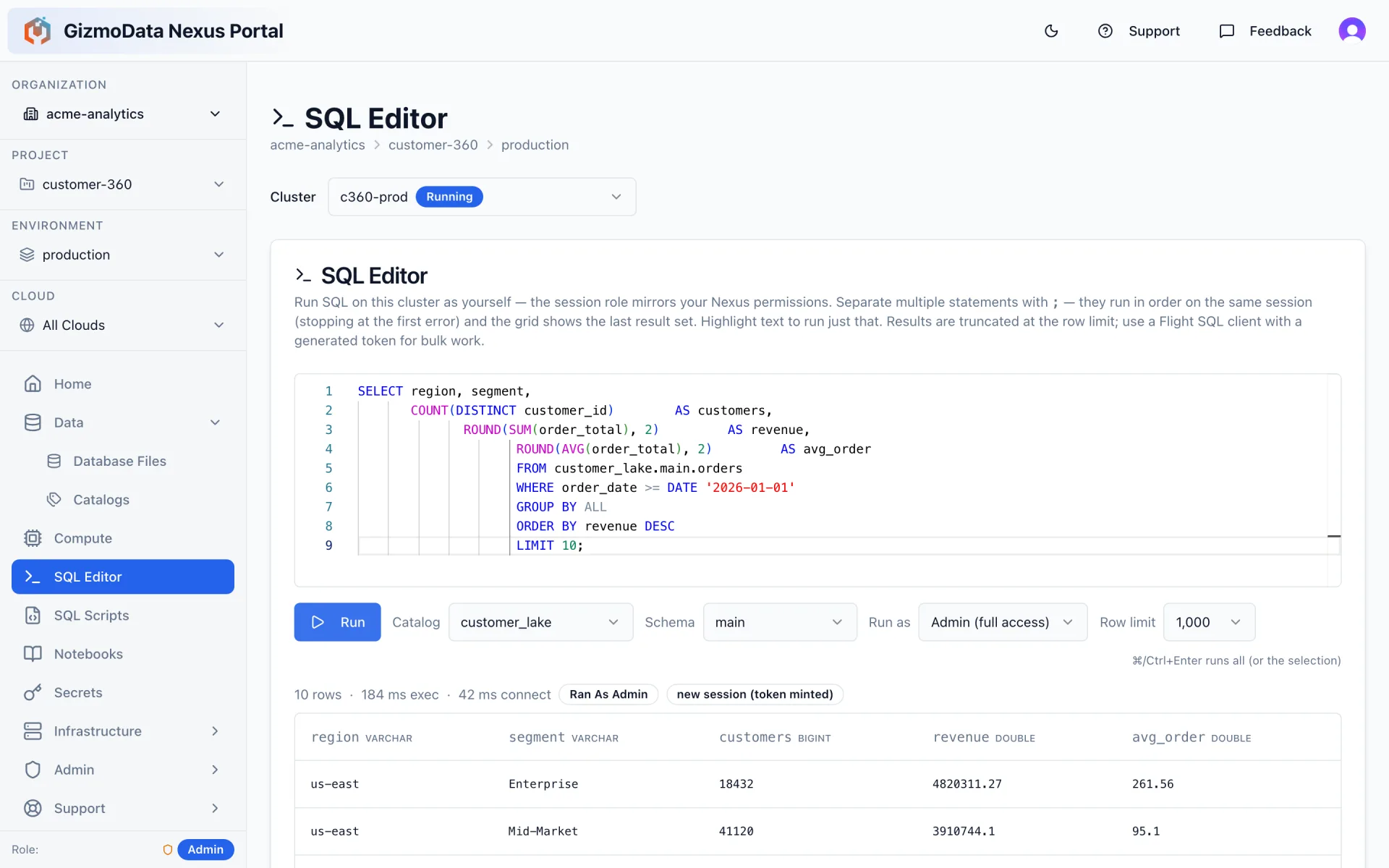
A Monaco-powered SQL editor is built into every cluster. Sessions run under your own GizmoData Cloud permissions (admin, user or read-only), results stream back over Arrow Flight SQL, and saved SQL scripts can be attached as cluster start-up scripts.
- Multi-statement batches, run-selection, row limits and query timeouts
- Catalog and schema pickers populated live from the engine
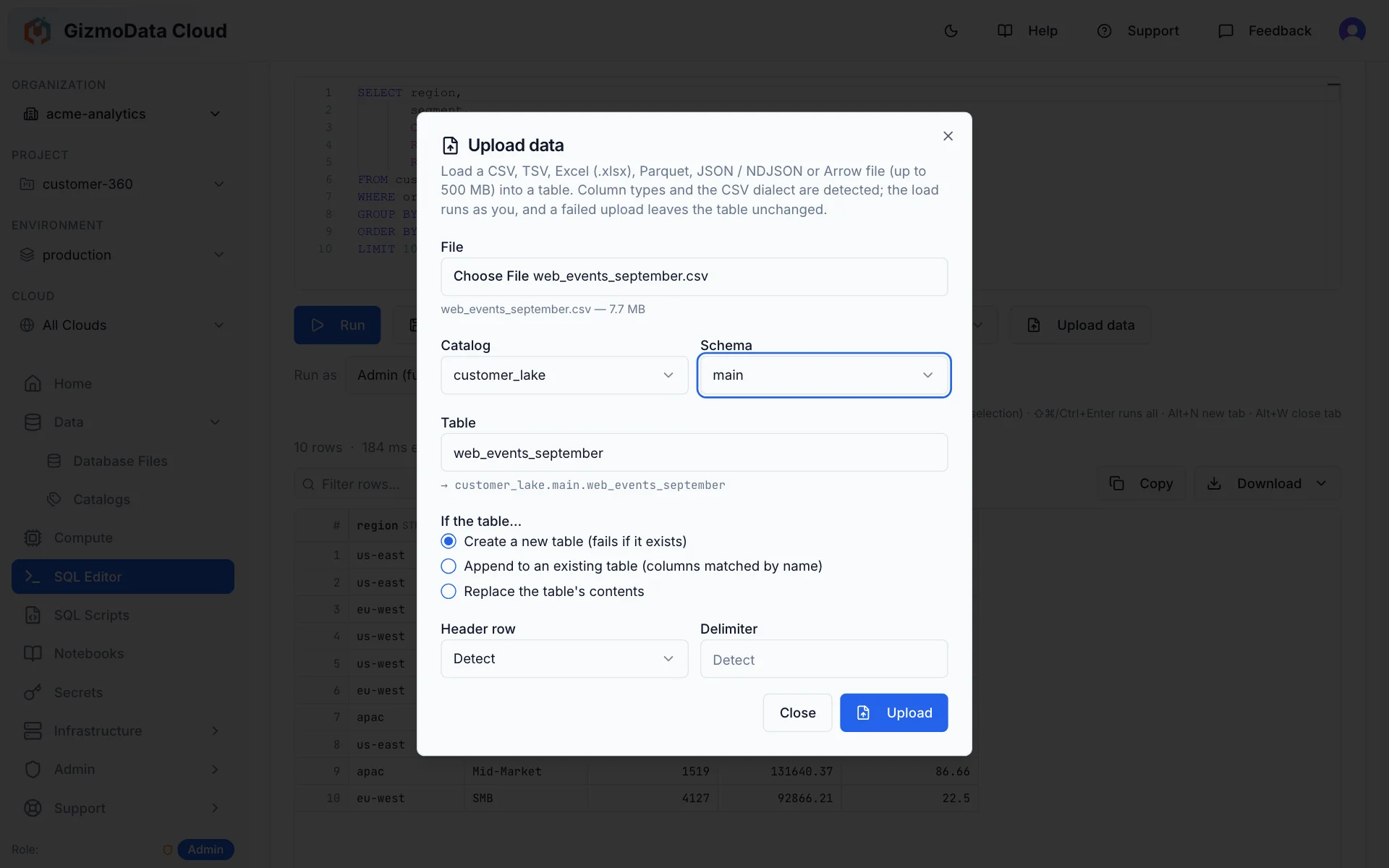
- Upload data: load a CSV, TSV, Excel, Parquet, JSON or Arrow file (up to 500 MB) into a new or existing table — column types and the CSV dialect are detected for you
- Generate a scoped connection token for DBeaver, Python (ADBC), JDBC or the GizmoSQL UI
Point Claude, Cursor or VS Code at any cluster in a minute
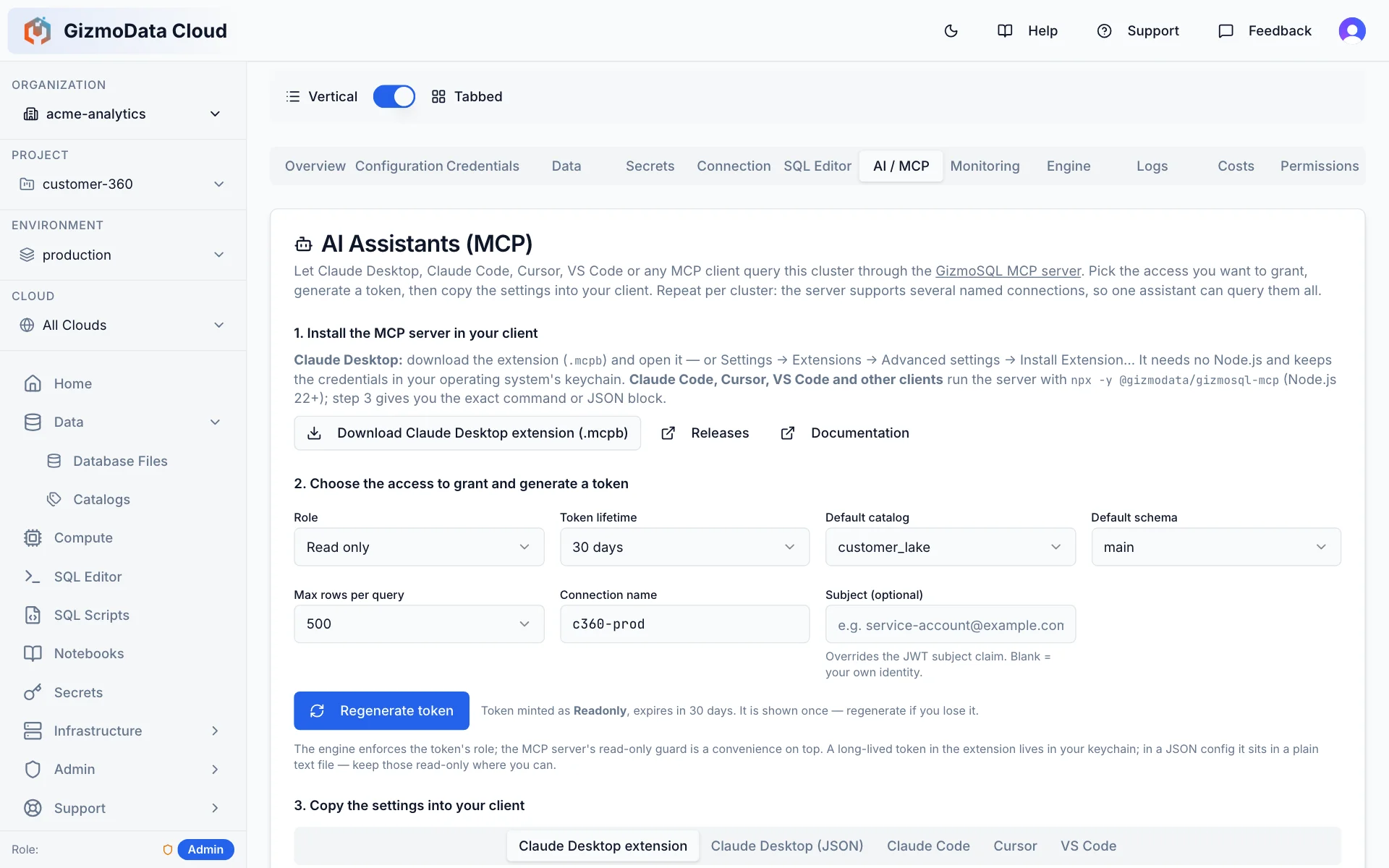
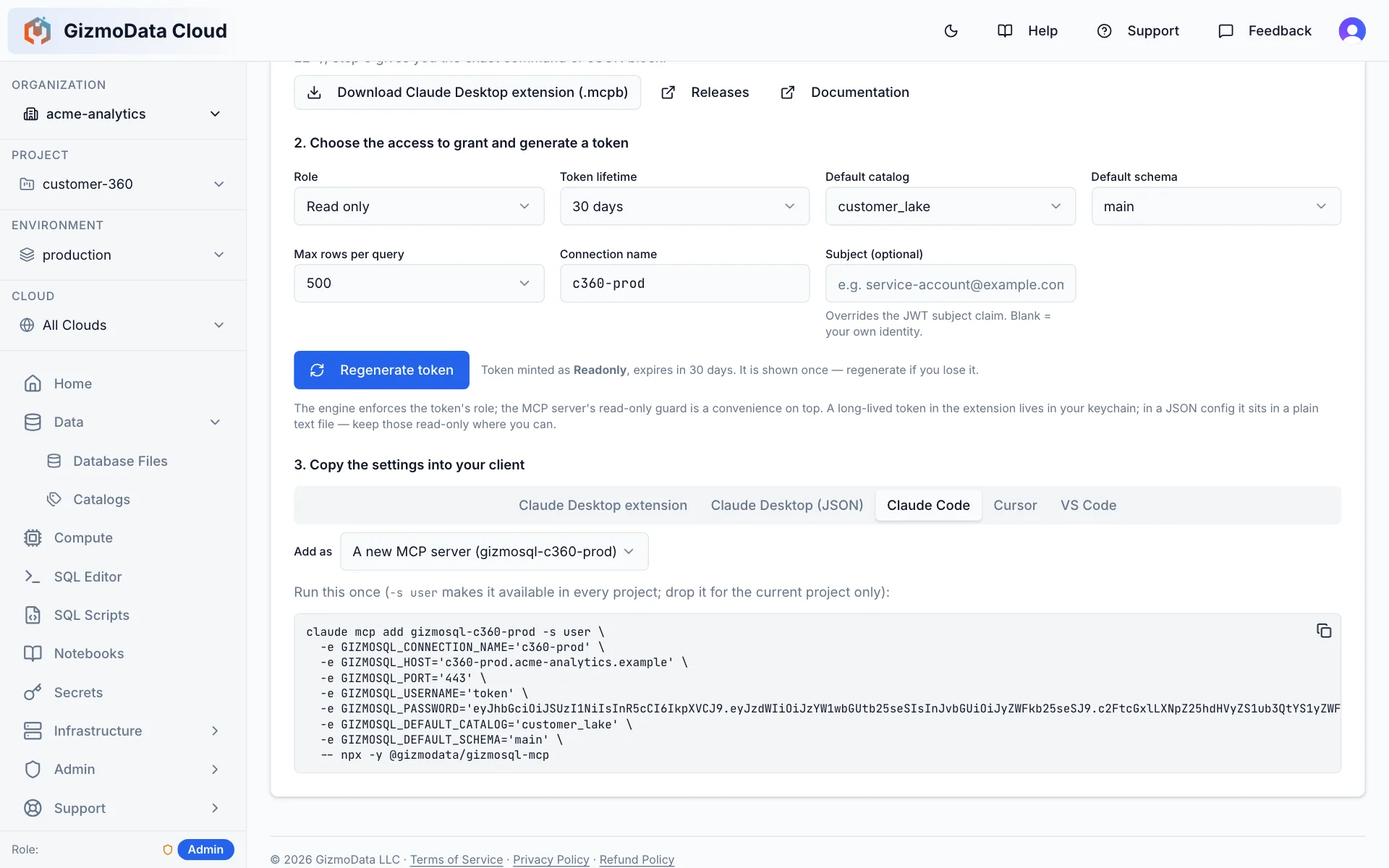
Every cluster has an AI / MCP tab that connects your AI assistant to it through the open-source GizmoSQL MCP server. Choose the access to grant, generate a token, and copy the ready-made settings for your client — then ask questions of your DuckLake data in plain English. The assistant explores catalogs, schemas and tables, describes columns, explains query plans and runs SQL, with results capped at the row limit you set.
- Ready-to-paste settings for the Claude Desktop extension (no Node.js; the token is kept in your keychain), Claude Desktop JSON, Claude Code, Cursor and VS Code
- Least privilege by default: tokens are read-only unless you pick a wider role, and the engine enforces it; writes need an explicit switch
- Token lifetimes from 24 hours to a year, a default catalog and schema, and a max-rows cap per query
- Named connections: add several clusters — across clouds — to one assistant and let it switch between them; Enterprise clusters can also scope a token to specific catalogs
See what every cluster is doing — down to the engine
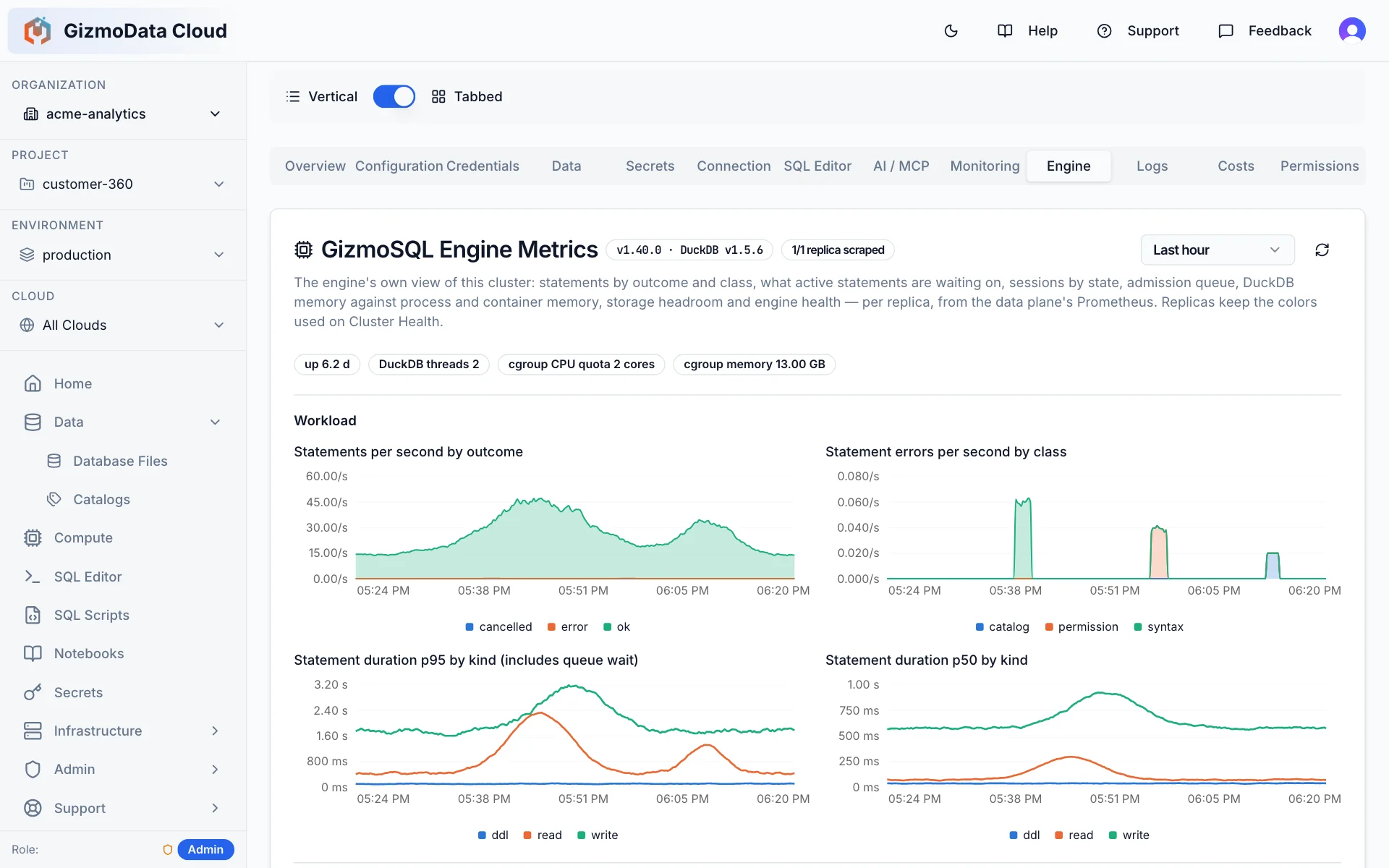
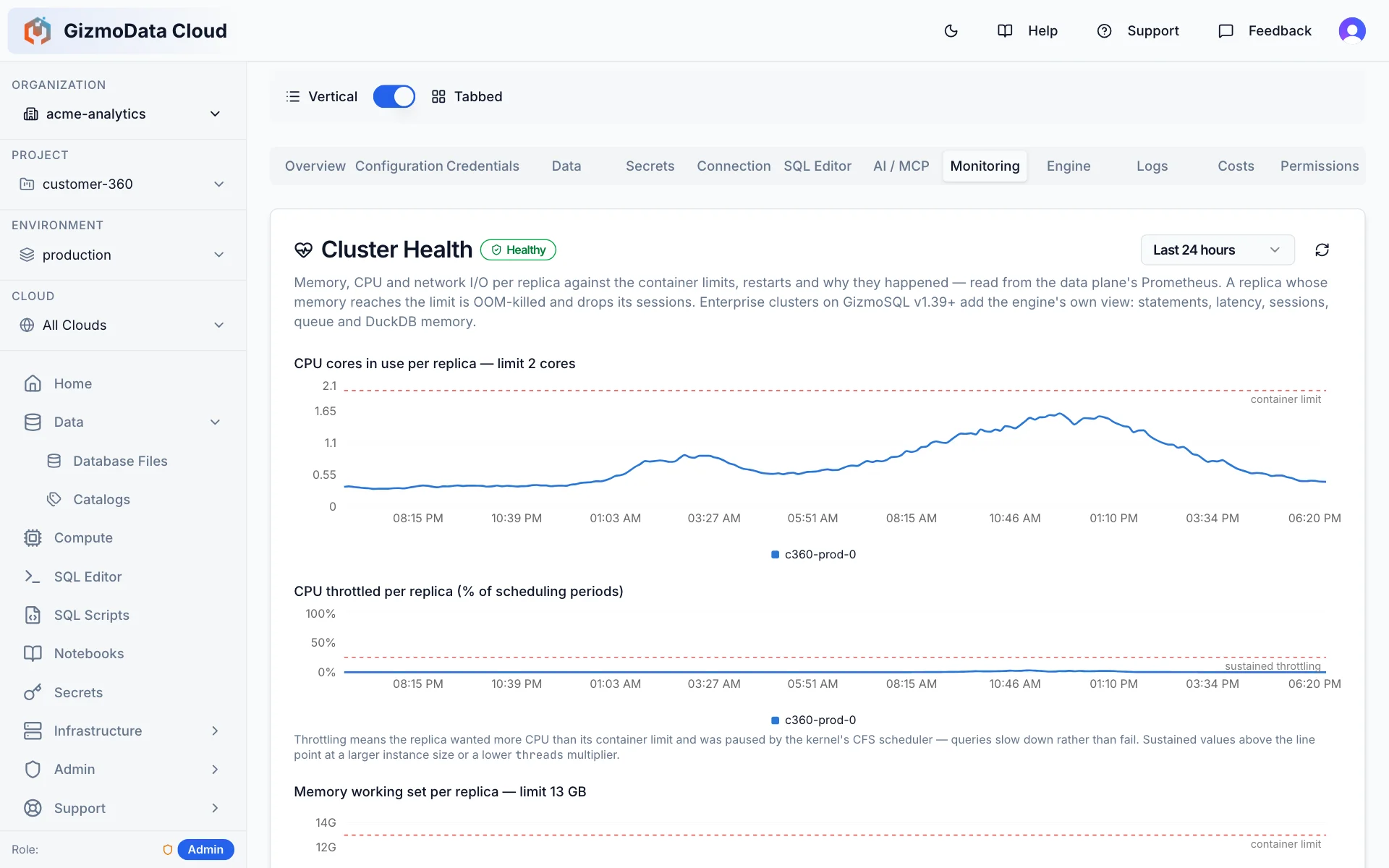
Every cluster has a Monitoring tab: CPU, memory and network per replica against the container limits, plus restarts and OOM kills with the reason they happened — read from the data plane’s Prometheus. On Enterprise Edition clusters, an Engine tab adds GizmoSQL’s own metrics: what the engine is running, waiting on and holding in memory.
- Monitoring (all clusters): CPU cores and throttling, memory working set, network I/O and ready replicas — over the last hour, 6 hours, 24 hours or 7 days
- Restarts and OOM kills per replica and why they happened, with an at-a-glance health badge
- Engine (Enterprise): statements per second by outcome, errors by class, and p50 / p95 latency by statement kind
- Engine (Enterprise): active statements by wait state, admission queue and sessions, and DuckDB’s memory pool against process and container memory, spill and temp storage
Engine metrics come from the GizmoSQL engine’s own Prometheus endpoint, which is part of GizmoSQL Enterprise Edition. Core Edition clusters get the Monitoring tab.
Attach Oracle, Snowflake, PostgreSQL, Db2 and more — and query them live
GizmoData Cloud clusters run GizmoSQL's -adbc container images (v1.38.0+), which ship with 14 ADBC drivers pre-installed and loadable by name. Store the connection credentials once as an ADBC secret in GizmoData Cloud, ATTACH the remote database from SQL, and federate — join Snowflake or Oracle tables against your DuckLake catalogs in a single query, with results streaming back over Arrow Flight SQL. We query Snowflake live from a GizmoData Cloud–provisioned cluster exactly this way.
Credentials managed by GizmoData Cloud
The GizmoData Cloud portal and API fully support creating ADBC secrets: typed, encrypted at rest, scoped to an organization, project or environment, and injected into every cluster in scope at start-up — no credentials in your SQL.
ATTACH, then just write SQL
DuckDB's ADBC community extensions run inside GizmoSQL — the ADBC Scanner by our partner Query.Farm, and the adbc extension by Columnar (whose dbc installer supplies the ten third-party drivers in our images; the four GizmoData drivers ship from our own releases) — so an attached Snowflake, Oracle or PostgreSQL database reads like a local catalog, with filter pushdown and writes supported too.
Federate across GizmoSQL itself
The bundled native GizmoSQL ADBC driver means one cluster can attach another — query a cluster in a different cloud or region from the one you are connected to, over Arrow Flight SQL end to end.
Guided where it helps, explicit where it matters
The cluster wizard walks you through cloud and region, shape, engine, catalogs, secrets, security and autoscaling — inheriting scope defaults at every step, and showing you exactly what it resolved.
The best way to run DuckDB in the cloud
A bold claim, so here is the case. DuckDB is the fastest analytical engine most teams will ever touch — but on its own it is a library. GizmoData Cloud is the platform that turns it into a secure, multi-tenant, multi-cloud service: GizmoSQL for the serving, DuckLake for the data, and everything around them handled.
Real DuckDB, served properly
GizmoSQL wraps the actual DuckDB engine in an Apache Arrow Flight SQL server — concurrent sessions, TLS, authentication, and columnar results streamed to any Arrow client. Not a serverless facade in front of a different engine.
Hardware DuckDB was made for
Single-node analytics wants big memory and fast local disk. GizmoData Cloud provisions GizmoSQL on memory-optimised, local-NVMe shapes — AWS Graviton r8gd, GCP Axion C4A local-SSD, Azure Cobalt Epdsv6 — with per-cloud thread and memory tuning applied automatically.
DuckLake as a first-class citizen
Lakehouse catalogs on S3, GCS or Azure with a PostgreSQL metastore are a native object — mountable to any number of clusters, region-aware, schema-browsable without compute, and governed so scans never silently cross regions.
Any cloud, any region, one console
A single control plane manages Kubernetes data planes in AWS, Google Cloud and Azure at once. Put compute next to each dataset and administer everything with one hierarchy, one set of roles, one audit trail.
Enterprise controls without the enterprise price tag
SSO/OAuth, per-catalog permissions, firewall rules, encrypted secrets, workload identities, instrumentation catalogs and query queuing — the pieces you would otherwise bolt on yourself, already wired in.
Operated like software, not snowflakes
Every deployment is a versioned Helm release with a changelog, an automated end-to-end smoke test that provisions a real cluster and runs a query, and rollback on failure. Upgrades are boring — on purpose.
Everything else a data platform needs
Not a thin wrapper around a container — the operational layer your team would otherwise have to build.
Organizations, projects & environments
A real hierarchy — organization → project → environment → deployment target — so production and staging never share defaults by accident.
Role-based access at every level
Admin, writer and reader roles scoped to an organization, project or environment. Invite teammates by email; roles flow down the hierarchy.
Audit trail
Every change made through the API is recorded — who, what, when and with which request — and searchable from the portal.
Autoscaling & schedules
Scale replicas on CPU and memory targets, or on a calendar: scale up for the morning dashboard rush, down for the weekend.
Firewall rules & TLS everywhere
CIDR allow-lists per cluster, TLS terminated at the load balancer or the pod, and OAuth/SSO for GizmoSQL sessions.
Instrumentation & query logs
Point a cluster at an instrumentation catalog and every query, session and P99 lands in DuckLake tables you can query yourself.
Database files
Upload DuckDB files to a persistent volume with S3 backups, mount them read-only or single-writer, and import them as a background job.
Built-in support & incidents
Open a ticket from any cluster, see platform incidents in-app, and get Sev-1 SMS paging on Business and Enterprise plans.
SQL scripts & notebooks
Save SQL scripts to reuse across clusters or run them at start-up; notebooks for exploratory analysis.
Start free with $25 of credit
No credit card needed. Your $25 of trial credit runs real GizmoSQL clusters; pick a plan only when it runs out.
- 1Click Start free and sign up with Google, Microsoft, Apple or GitHub
- 2Create your organization: the $25 launch credit is applied automatically
- 3Launch a cluster — no credit card until the credit is used up
Pricing
Prepaid tiers, no surprises. The monthly fee comes straight back as compute credit; clusters draw it down by the hour at the price you see when you create them.
Starter
$29 / month
returned in full as compute credit
- Up to 8 vCPUs running at once
- Usage beyond the credit billed at the same hourly price; charged mid-month past $100 unbilled
- Managed storage at $0.05 per GB-month
- AWS, Google Cloud and Azure regions; spot capacity at spot rates
Try it on real data. One small cluster, or a few spot ones.
Team
$99 / month
returned in full as compute credit
- Up to 32 vCPUs running at once
- Usage beyond the credit billed at the same hourly price; charged mid-month past $300 unbilled
- Managed storage at $0.05 per GB-month
- AWS, Google Cloud and Azure regions; spot capacity at spot rates
A team's day-to-day analytics with headroom for a big job.
Business
$499 / month
returned in full as compute credit
- Up to 128 vCPUs running at once
- Usage beyond the credit billed at the same hourly price; charged mid-month past $1,500 unbilled
- Managed storage at $0.05 per GB-month
- AWS, Google Cloud and Azure regions; spot capacity at spot rates
Multiple environments and heavy workloads, with Sev-1 support that pages our on-call engineer.
Enterprise
Custom vCPU quotas, invoicing and contracts, dedicated tenancy, Cloud at Customer in your own accounts, and GizmoSQL Enterprise hosted for you.
Compute is priced per cluster-hour from the machine size, replicas and license edition you choose — the hourly price is shown before you create or resize a cluster. Prepaid credit expires at the end of the month it was paid for; promotional credit has its own expiry and no cash value. Prices in USD; taxes may apply. See the Terms of Service and Refund Policy.
Frequently Asked Questions
What is GizmoData Cloud?
GizmoData Cloud is the fully managed service for GizmoSQL. Its control plane — the GizmoData Cloud portal and API at app.gizmodata.com — lets you provision GizmoSQL clusters, DuckLake catalogs, secrets and infrastructure across AWS, Google Cloud and Microsoft Azure from a single pane of glass, with organization/project/environment scoping, role-based access and an audit trail.
Which clouds and regions does GizmoData Cloud support?
The data plane runs on Kubernetes in AWS (EKS), Google Cloud (GKE) and Microsoft Azure (AKS). Self-serve organizations launch today in AWS US East 2 (Ohio), Google Cloud us-east4 (Northern Virginia) and Azure East US 2 (Virginia). Because catalogs are region-aware, GizmoData Cloud can place compute next to your data and can block cross-region mounts that would incur egress.
Can I get GizmoData Cloud in my region?
Yes. If you need compute in a region we do not run yet, for latency, to sit next to your data, or for data residency, request it at gizmodata.com/contact. New regions are available to Business and Enterprise customers: we can stand up a new AWS, Google Cloud or Azure region quickly, often in less than one day. Starter and Team organizations use the regions listed above.
Is the control plane tied to one cloud?
No. The control plane is cloud-agnostic and can manage Kubernetes clusters in several clouds at once. GizmoData also offers Cloud at Customer, where the control plane and data planes run inside your own cloud account — see gizmodata.com/cloud/at-customer.
What is a DuckLake catalog?
DuckLake is the open lakehouse format from the DuckDB team: a SQL metastore (PostgreSQL) plus Parquet files in object storage. In GizmoData Cloud a catalog bundles the metastore credentials, the storage credentials and the data path, so it can be mounted to any number of GizmoSQL clusters and shared across teams. For more details, see ducklake.select(opens in a new tab).
Can I use an existing Hive Metastore?
Yes. Create a Hive Metastore catalog and give it the metastore’s Thrift address (thrift://host:port) and, optionally, credentials and a warehouse location for its table files in S3, GCS or Azure Blob Storage. GizmoSQL clusters can then query the tables it tracks and create new ones. Hive 2.x and 3.x metastores are supported (not Hive 4). The metastore must be reachable from your GizmoSQL clusters, and the Thrift connection has no authentication, so keep it on a private network.
Can GizmoData Cloud run federated queries against Snowflake, Oracle or other databases?
Yes. GizmoData Cloud clusters run GizmoSQL’s -adbc container images (v1.38.0+), which bundle 14 ADBC drivers — Snowflake, Oracle, PostgreSQL, IBM Db2, BigQuery, Databricks, Redshift, SQL Server, MySQL, Trino, Exasol, Arrow Flight SQL, DuckDB (Quack) and GizmoSQL itself. Create an ADBC secret in the GizmoData Cloud portal or API, ATTACH the remote database from SQL, and query it live — joining its tables against your DuckLake catalogs in a single query.
Can I try DuckDB 2.0 on GizmoData Cloud?
Yes, on the experimental Edge release channel. When you create a cluster, choose Edge (experimental) as its Release Channel and pick a GizmoSQL Edge image: it runs GizmoSQL v1.41.0 or later on a DuckDB 2.0 pre-release (today v2.0.0-alpha43763). Edge is for evaluating DuckDB 2.0 early and is not for production workloads; database files an Edge cluster creates cannot be opened by the Stable or LTS channels. Edge clusters can mount your existing DuckLake catalogs without upgrading their format, so your Stable clusters can still attach them. Stable is the default channel, and LTS is available too. See gizmodata.com/news#gizmosql-edge-channel-duckdb-2.
Can I use my own storage?
Yes, for your data. The compute is fully managed: GizmoSQL clusters run on GizmoData-managed Kubernetes in the cloud and region you pick, so there is no infrastructure to register or operate. Your DuckLake catalogs can use GizmoData-managed storage or point at your own buckets and PostgreSQL metastores, with the credentials stored as encrypted secrets. If you need the whole platform, compute included, inside your own cloud accounts, see Cloud at Customer at gizmodata.com/cloud/at-customer.
How is GizmoData Cloud priced?
Self-serve plans are prepaid tiers: Starter ($29/month, up to 8 vCPUs running at once), Team ($99/month, 32 vCPUs) and Business ($499/month, 128 vCPUs). The monthly fee comes back in full as compute credit, clusters draw it down at the hourly price shown when you create them, and usage beyond the credit is billed at that same price. Shared compute sizes (Pico, Nano and Micro) start at $0.028 per hour for development and light workloads. Managed storage — DuckLake catalog data and cluster data volumes — is $0.05 per GB-month. Enterprise plans with custom quotas, contracts and Cloud at Customer are priced by agreement.
What happens to unused credit, and can I get promotional credit?
Prepaid compute credit is good for the month it was paid for and expires at the end of that billing period. Promotional credit — from an invitation or from GizmoData — is a gift with its own expiry, applies to metered usage only and has no cash value. Your billing page shows both kinds separately, what each has left, and how the current period is being covered.
How do I sign up?
GizmoData Cloud is generally available and open to everyone: sign up at app.gizmodata.com (Google, Microsoft, Apple or GitHub), create your organization and launch your first cluster. For launch, signing up through any Start free button on this site gives your first organization $25 of trial credit, applied automatically, so you can start without a credit card; you choose a plan when the credit runs out. If you already run GizmoSQL Enterprise, we can host it for you too.
From the Blog
Benchmarks, launches and architecture deep dives on GizmoData Cloud
Three Clouds, One API: A 1 TB TPC-H Horse Race on GizmoData Cloud (AWS vs. Google Cloud vs. Azure)
Six 64-vCPU GizmoSQL clusters on AWS, Google Cloud and Azure raced 1 TB of TPC-H on local NVMe and DuckLake. Graviton5 ran the fastest lap (79 s, $0.30), Google Cloud took four of six golds, and DuckDB 2.0 won every lane. 38 minutes, about $37, one API.
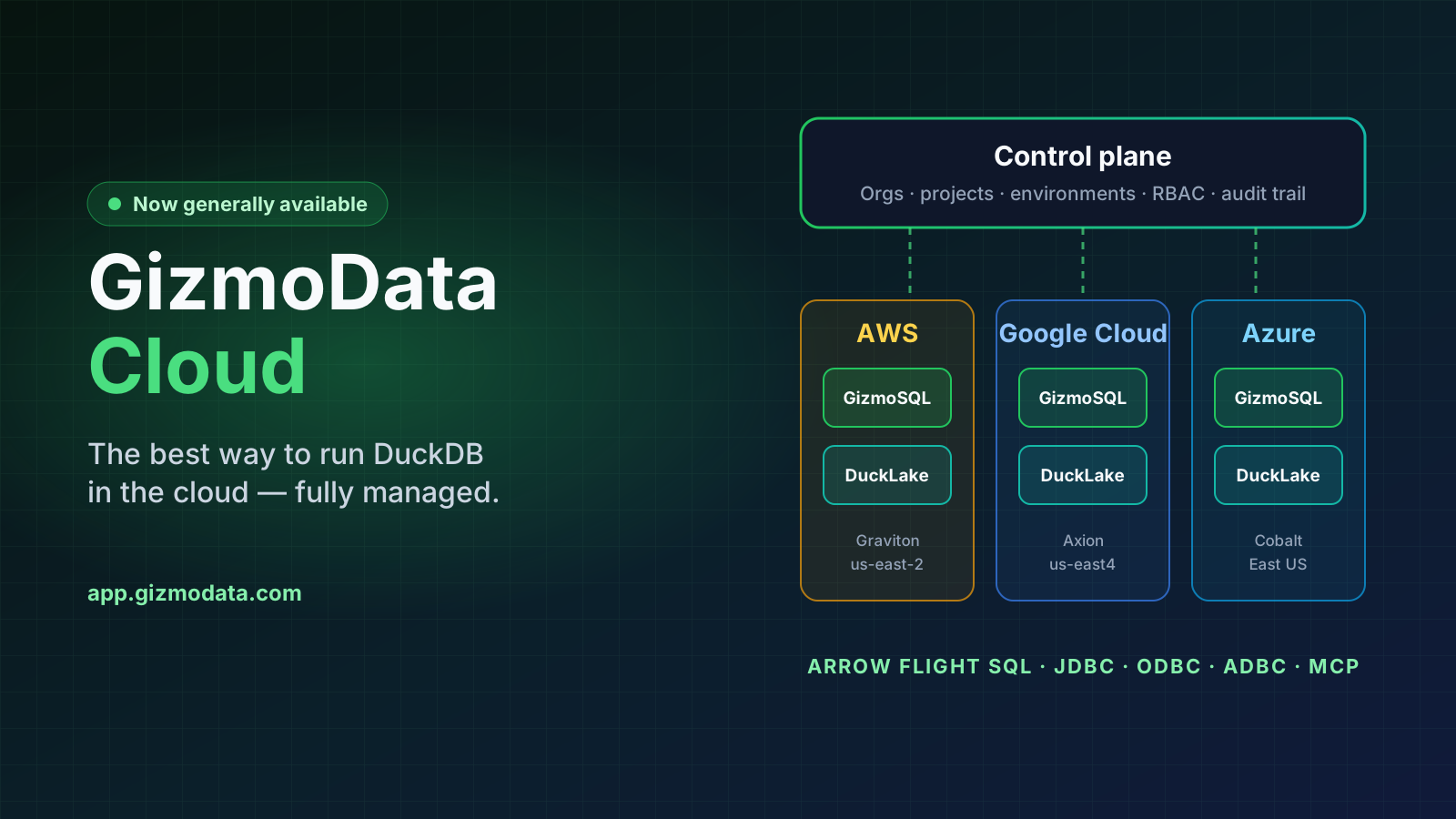
Introducing GizmoData Cloud: The Best Way to Run DuckDB in the Cloud
GizmoData Cloud is generally available: fully managed GizmoSQL clusters, DuckLake catalogs and federated queries on AWS, Google Cloud and Azure. Sign up free. Start free with $25 of launch credit, applied automatically, no credit card.

GizmoSQL + DuckLake: Elastic Compute Over Shared State
Scaling nodes that share mutable data is the hard part of analytics. With DuckLake holding the transactional catalog and Parquet in object storage, a GizmoSQL cluster grows from one node to five and back with nothing to copy, sync, or reconcile.
Run GizmoSQL where your data lives — without running it yourself
Sign up, create your organization and have a GizmoSQL cluster running in minutes — on AWS, Google Cloud or Azure. Need custom quotas or a contract? Talk to us.