GizmoSQL UI
A free, browser-based SQL interface for GizmoSQL servers. Write queries in a Monaco-powered editor, browse schemas, and export results — over Apache Arrow Flight SQL, with zero configuration. One self-contained executable, talking directly to your server: your data never touches a third party.
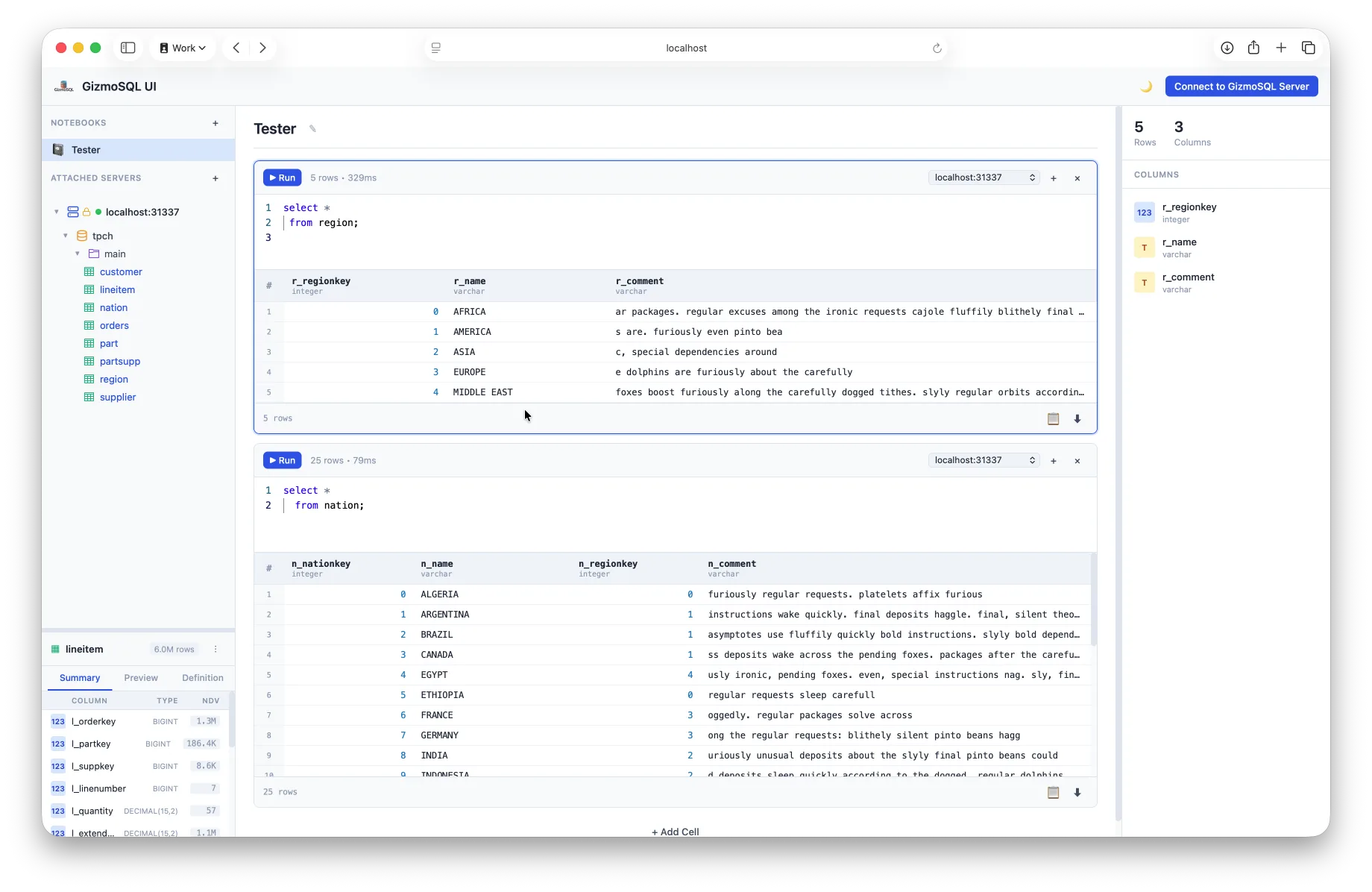
The SQL editor, schema browser, and results grid — connected to a GizmoSQL server over Arrow Flight SQL.
Everything You Need to Query GizmoSQL
A modern SQL workbench in your browser — no IDE install, no JDBC setup
Monaco SQL Editor
The same editor engine that powers VS Code — SQL syntax highlighting, autocomplete, and multi-statement editing right in your browser.
Schema Browser
Browse catalogs, schemas, tables, and columns in a familiar tree view, so you can explore a database without writing a single query.
Type-Aware Results Grid
Query results render in a fast, responsive table with type-aware formatting — numbers, timestamps, and nested types all display correctly.
Export to CSV, JSON & Parquet
Send any result set straight to CSV, TSV, JSON, or Parquet — including Parquet for handing data to the next tool in your pipeline.
TLS & Authentication
Connect to local or remote GizmoSQL servers with full TLS support and username/password authentication — the same security as any other GizmoSQL client.
Self-Contained & Private
One executable with the runtime baked in — no Node.js, no Docker, nothing else to install. It talks directly to your GizmoSQL server, so your queries and data never touch a third-party service.
Enterprise-Ready, Out of the Box
Point GizmoSQL UI at a GizmoSQL Enterprise server and it lights up with identity and administration features
OAuth / SSO Sign-In
Connecting to a GizmoSQL Enterprise server? Sign in through your identity provider with a browser-based OAuth/SSO flow — no shared passwords, and every session maps to a named user.
Session Admin Screen
Admins on Enterprise servers get a built-in session administration screen: see every active session and kill a runaway one with a click — GizmoSQL's KILL SESSION, without leaving the UI.
Running Core? Everything else on this page works exactly the same. See what Enterprise adds →
Install GizmoSQL UI
Pick your platform — every install ends the same way: run gizmosql-ui and your browser opens at localhost:3000.
Install with Homebrew (the brew trust step is required as of Homebrew 6.0):
brew tap gizmodata/tap
brew trust gizmodata/tap
brew install gizmosql-ui
gizmosql-ui
No GizmoSQL Server Yet? Start One in Seconds
This Docker one-liner starts a GizmoSQL server and generates TPC-H demo tables, so you have real data to query the moment GizmoSQL UI connects.
docker run --name gizmosql \
           --detach \
           --rm \
           --tty \
           --init \
           --publish 31337:31337 \
           --env TLS_ENABLED="1" \
           --env GIZMOSQL_USERNAME="gizmosql_user" \
           --env GIZMOSQL_PASSWORD="gizmosql_password" \
           --env INIT_SQL_COMMANDS="CALL dbgen(sf=0.01);" \
           --pull always \
           gizmodata/gizmosql:latest
Then connect GizmoSQL UI with:
- Host: localhost
- Port: 31337
- Username: gizmosql_user
- Password: gizmosql_password
- Use TLS: enabled
Prefer a native install of the server? See the GizmoSQL install page →
Under the Hood
A modern, actively maintained stack — and a reference application for the official GizmoSQL Node.js client
Next.js 16 + React 19
Built on the current generation of the web stack — fast, modern, and actively maintained.
Monaco Editor
The editor engine from VS Code powers the SQL editing experience.
@gizmodata/gizmosql-client
The UI is built on the official GizmoSQL Node.js client — the same Arrow Flight SQL client you can npm install — so it doubles as a reference application.
Apache Arrow + parquet-wasm
Results stay columnar end-to-end, and Parquet export runs via WebAssembly.
Single-executable packaging
The entire app — server, assets, and the Node 24 runtime — compiles into one Brotli-compressed executable per platform.
Building your own tool? Start from the same client library on npm →
What is GizmoSQL UI?
GizmoSQL UI is a free, browser-based SQL interface for GizmoSQL servers. It bundles a Monaco-based SQL editor, a schema browser, a type-aware results grid, and one-click export to CSV, TSV, JSON, or Parquet — all speaking Apache Arrow Flight SQL to any local or remote GizmoSQL server.
How do I install GizmoSQL UI?
On macOS or Linux, install with Homebrew: brew tap gizmodata/tap, brew trust gizmodata/tap, then brew install gizmosql-ui. On Windows, download the signed MSI installer (x64 or arm64) from the GitHub releases page. Standalone executables for Linux, macOS, and Windows are also available. Run gizmosql-ui and it opens in your browser at localhost:3000.
Is GizmoSQL UI free?
Yes. GizmoSQL UI is free and open source, just like GizmoSQL Core. It works with both GizmoSQL Core and GizmoSQL Enterprise servers.
Do I need a GizmoSQL server to use GizmoSQL UI?
Yes — GizmoSQL UI is a client. If you don't have a server yet, you can start one in seconds with Docker; the gizmodata/gizmosql image can even generate TPC-H demo tables on startup so you have data to query immediately.
Does GizmoSQL UI support SSO / OAuth?
Yes. When connecting to a GizmoSQL Enterprise server, GizmoSQL UI supports browser-based OAuth/SSO sign-in through your identity provider. Enterprise admins also get a session administration screen where they can view active sessions and kill runaway ones (GizmoSQL's KILL SESSION) directly from the UI.
What is GizmoSQL UI built with?
GizmoSQL UI is built with Next.js 16 and React 19, uses the Monaco editor (the editor engine from VS Code) for SQL editing, and speaks Apache Arrow Flight SQL via the official @gizmodata/gizmosql-client Node.js library. Parquet export runs in WebAssembly via parquet-wasm, and the whole app is packaged into a single self-contained executable per platform — no Node.js install required.