GizmoData Cloud at Customer
The whole platform — control plane and data planes — inside your own cloud accounts. Multiple clouds and regions, one pane of glass, nothing leaves your boundary.
The best way to run DuckDB in the cloud, delivered into the cloud you already run: GizmoSQL clusters on EKS, GKE and AKS, DuckLake catalogs on your buckets, your IAM and secret stores, your observability stack — installed from Terraform and Helm, upgraded from tagged, smoke-tested releases.
In production at Vaden Automotive, Summation and Company Wrench
All three run GizmoData Cloud at Customer in production, inside their own cloud accounts.
“At Vaden Automotive Group, GizmoData in our Cloud has changed how quickly we get from a question to an answer. Its MCP server connects our data directly to AI, so our team can ask questions in natural language and get real analysis through simple prompts, then turn those results into artifacts and working applications in a fraction of the time it used to take. That makes prototyping effortless and gives us rapid insights without long development cycles. It’s fast, lightweight, and delivers true business intelligence across our entire dealership group without the large price tag. GizmoSQL has become a core part of how we see and run our business.”


“We love [GizmoData Cloud at Customer] at Summation. Excited to see this as a publicly available service.”


Everything that touches data stays with you
The trust boundary is your account. GizmoData is on the outside of it — publishing releases and answering the phone.
Why teams choose Cloud at Customer
Data residency, regulatory scope, an existing cloud commit, or simply a platform team that wants to own what it runs — without building a DuckDB service from scratch.
Your account. Your boundary.
The GizmoData Cloud at Customer control plane, its PostgreSQL metadata store and every GizmoSQL data plane run inside your cloud account(s) — your VPCs, IAM, KMS keys and network policy. GizmoData has no standing access to your data.
Your identities, not static keys
GizmoSQL pods reach S3, GCS or ADLS through IRSA, GKE Workload Identity or Azure managed identity. Credentials that must exist live in your Secrets Manager, Secret Manager or Key Vault and are read via external secret providers.
Still multi-cloud, still one console
One control-plane install manages EKS and GKE (and AKS) data planes at the same time — the way our existing installs run today. Region-aware defaults and cross-region egress governance apply exactly as in the public cloud.
Delivered as code
Infrastructure is Terraform in your repo; the platform deploys with Helm from GitHub Actions on tagged releases, each with a changelog. You review every change the way you review any other change.
Observability you own
Grafana, Tempo and Prometheus with OpenTelemetry, wired to your SSO, plus instrumentation and query-log catalogs in DuckLake tables you can query with GizmoSQL itself.
Operated with you
Support tickets and platform incidents inside the portal, Sev-1 SMS paging, and an end-to-end smoke test on every release that provisions a real cluster, runs a query and rolls back on failure — before it reaches you.
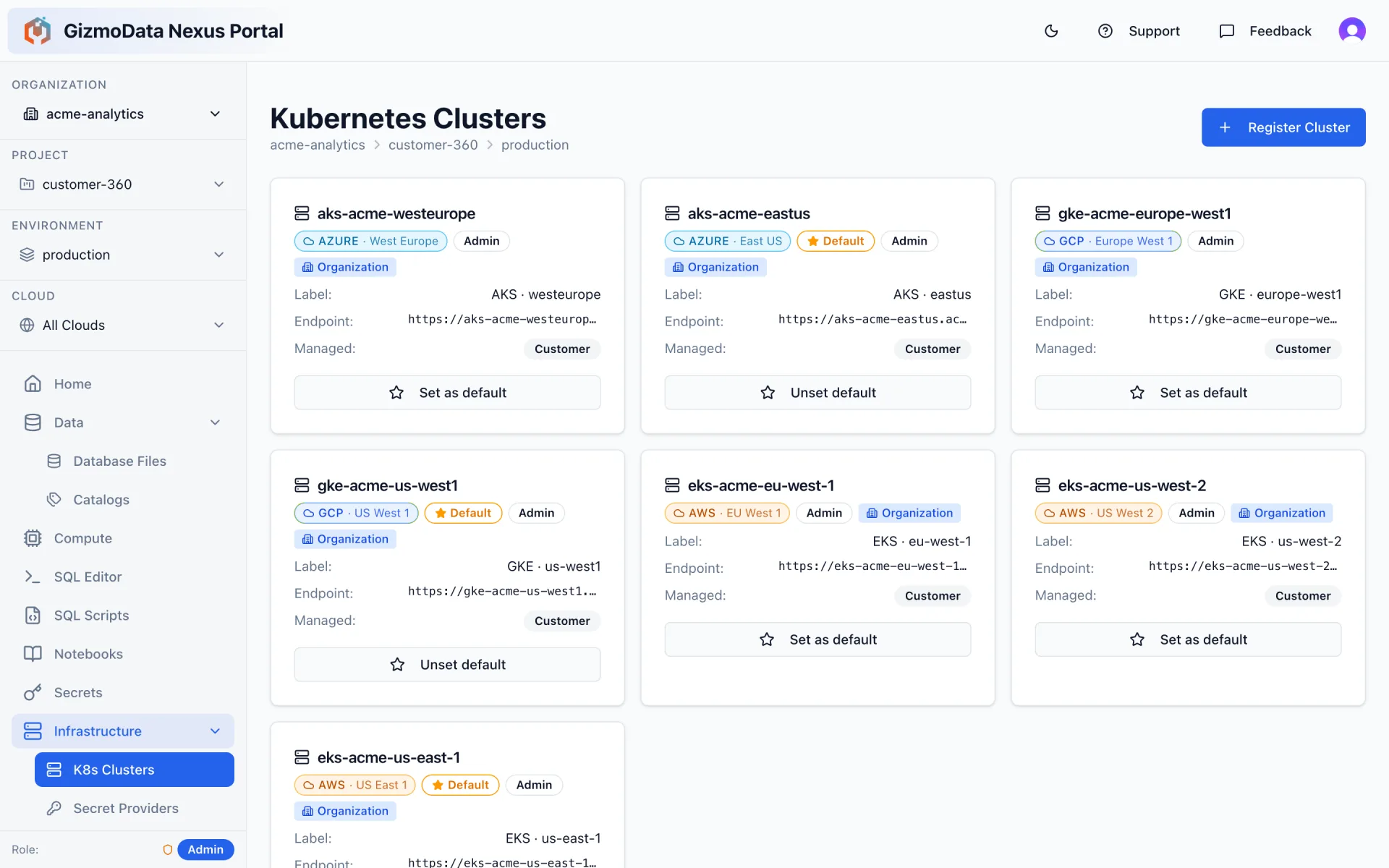
EKS, GKE and AKS side by side — as one estate
Register each cluster with its endpoint, region and ingress domain, mark a default per cloud at any scope, and every new GizmoSQL cluster resolves the right one up the hierarchy. Sandbox, staging and production are simply environments — with their own defaults, their own firewall rules and their own audit history.
- Customer-managed or GizmoData-managed clusters, mixed freely
- Per-cloud instance shapes validated against the target cluster
- Node-scheduling profiles for dedicated pools (Karpenter, Axion, spot)
- Private ingress domains and NLB / pod-terminated TLS per cluster
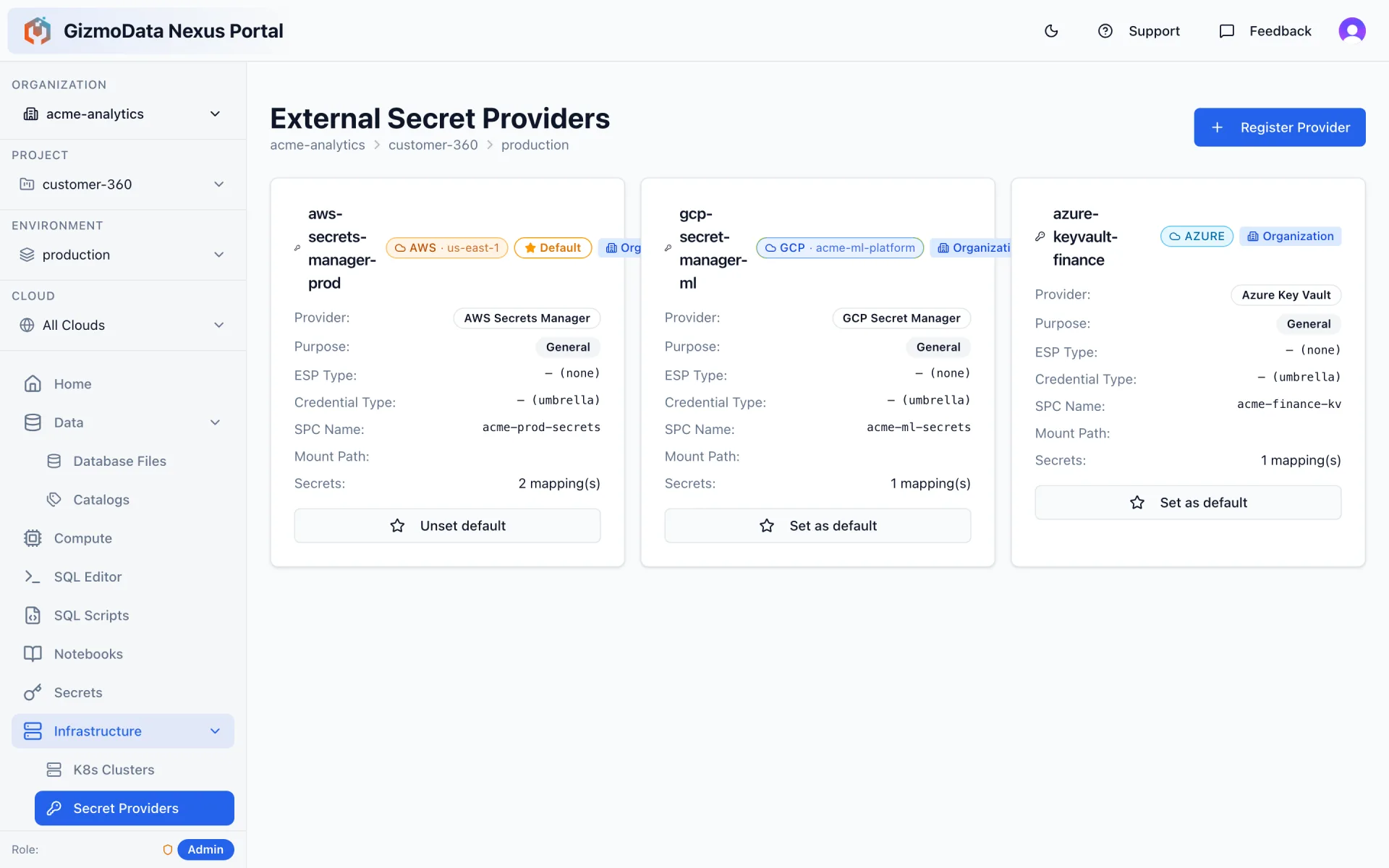
Credentials never get copied into the platform
External secret providers mount AWS Secrets Manager, GCP Secret Manager or Azure Key Vault secrets straight into GizmoSQL pods via the Secrets Store CSI driver. Workload identities give pods IRSA / Workload Identity access to buckets with no keys at all. What the control plane never holds, it can never leak.
- One provider per cloud, defaulted per scope — catalogs pick them up automatically
- Purpose-built providers for catalog master PostgreSQL and S3 credentials
- Rotation happens in your store; pods pick it up on restart
- Anything you do store in GizmoData Cloud at Customer is encrypted at rest with a key you control
From empty account to first query
The same path every existing install has followed — sandbox first, then staging and production through the identical pipeline.
- 01
Accounts & prerequisites
You provide a cloud account (or one per environment), a DNS zone and an identity provider. We provide the IAM policy set — least-privilege, reviewed by your security team.
- 02
Terraform the foundation
Kubernetes (EKS / GKE / AKS), node pools with the right shapes, PostgreSQL for metadata, object storage, secret stores, certificates and DNS — from the GizmoData Terraform modules, in your repo.
- 03
Deploy the control plane
Helm-install the GizmoData Cloud at Customer API and portal from a tagged release, seed your organization and environments, connect your IdP. Sandbox first; staging and production follow the same pipeline.
- 04
Register data planes
Point GizmoData Cloud at Customer at each Kubernetes cluster, set a default per cloud, and register workload identities, external secret providers, firewall rules and node-scheduling profiles.
- 05
First cluster, first catalog
Create a DuckLake catalog on your bucket and your metastore, launch a GizmoSQL cluster next to it, and run the first query — typically within the first day of the control plane being up.
GizmoData Cloud vs Cloud at Customer
Same software, same portal, same object model. The difference is who runs the control plane and where the boundary sits.
| GizmoData Cloud | Cloud at Customer | |
|---|---|---|
| Where the control plane runs | GizmoData-hosted | Your cloud account |
| Where data planes run | GizmoData-managed clusters | Your Kubernetes clusters |
| Where data & credentials live | Your buckets; secrets encrypted in the control plane | Entirely in your account — your buckets, your secret store, your KMS |
| Multi-cloud / multi-region | Yes — one console | Yes — one console |
| Identity | GizmoData Cloud sign-in (SSO available) | Your identity provider |
| Upgrades | Rolled out by GizmoData | Tagged releases you apply through your pipeline; smoke-tested first |
| Commercials | Usage-based | GizmoSQL Enterprise licence + installation & support |
| Best for | Teams that want zero infrastructure | Regulated, data-residency or existing-cloud-commit environments |
The best way to run DuckDB in the cloud
A bold claim, so here is the case. DuckDB is the fastest analytical engine most teams will ever touch — but on its own it is a library. GizmoData Cloud at Customer is the platform that turns it into a secure, multi-tenant, multi-cloud service: GizmoSQL for the serving, DuckLake for the data, and everything around them handled.
Real DuckDB, served properly
GizmoSQL wraps the actual DuckDB engine in an Apache Arrow Flight SQL server — concurrent sessions, TLS, authentication, and columnar results streamed to any Arrow client. Not a serverless facade in front of a different engine.
Hardware DuckDB was made for
Single-node analytics wants big memory and fast local disk. GizmoData Cloud provisions GizmoSQL on memory-optimised, local-NVMe shapes — AWS Graviton r8gd, GCP Axion C4A local-SSD, Azure Cobalt Epdsv6 — with per-cloud thread and memory tuning applied automatically.
DuckLake as a first-class citizen
Lakehouse catalogs on S3, GCS or Azure with a PostgreSQL metastore are a native object — mountable to any number of clusters, region-aware, schema-browsable without compute, and governed so scans never silently cross regions.
Any cloud, any region, one console
A single control plane manages Kubernetes data planes in AWS, Google Cloud and Azure at once. Put compute next to each dataset and administer everything with one hierarchy, one set of roles, one audit trail.
Enterprise controls without the enterprise price tag
SSO/OAuth, per-catalog permissions, firewall rules, encrypted secrets, workload identities, instrumentation catalogs and query queuing — the pieces you would otherwise bolt on yourself, already wired in.
Operated like software, not snowflakes
Every deployment is a versioned Helm release with a changelog, an automated end-to-end smoke test that provisions a real cluster and runs a query, and rollback on failure. Upgrades are boring — on purpose.
Frequently Asked Questions
What is GizmoData Cloud at Customer?
Cloud at Customer is the deployment option where the full GizmoData Cloud platform — control plane, portal and every GizmoSQL data plane — is installed inside your own cloud account(s) on AWS, Google Cloud or Azure. You get the managed-service experience of GizmoData Cloud with your data, credentials and network never leaving your boundary. It is how our current Cloud at Customer customers, including Summation, Vaden Automotive and Company Wrench, run today.
Which clouds can a single install manage?
Any combination of AWS (EKS), Google Cloud (GKE) and Azure (AKS). One control plane registers Kubernetes clusters in several clouds and regions and treats them as one estate: region-aware defaults, per-cloud instance shapes, and cross-region egress governance all work across clouds.
Does GizmoData need access to my account?
Not on an ongoing basis. Installation is done from Terraform and Helm in your pipeline, with IAM policies you review. GizmoData publishes signed container images and versioned charts; your pipeline pulls them. Support engagements that require hands-on access are scoped and time-boxed by you.
How are upgrades handled?
Every release is a semantic-version tag with a changelog. Before a release is considered good, an end-to-end smoke test provisions a real GizmoSQL cluster, waits for DNS and TLS, connects with an Arrow Flight SQL client and runs a query — and rolls back automatically on failure. You then apply the release to sandbox, staging and production through your own pipeline.
What does it cost?
Cloud at Customer is licensed as GizmoSQL Enterprise (per vCPU) plus an installation and support engagement sized to the number of clouds, environments and integrations. Cloud compute and storage are billed by your provider on your existing commitments.
Can I start at customer and move to GizmoData Cloud later — or vice versa?
Yes. Both run the same software with the same object model, so organizations, catalogs and cluster definitions carry across. Data stays in your buckets in either case.