News & Updates
The latest announcements, events, and product updates from GizmoData

GizmoSQL v1.41.0: The Experimental Edge Channel Brings DuckDB 2.0 Early
GizmoSQL v1.41.0 introduces the Edge release channel. It is experimental and not for production workloads. Edge builds GizmoSQL against the next DuckDB major before it is released, which today is the DuckDB 2.0 pre-release v2.0.0-alpha43763. It is there so you can test your workloads, clients and data on DuckDB 2.0 and use its new features early, while Stable stays on DuckDB v1.5.6 and LTS on v1.4.5. All three channels share the same GizmoSQL code, flags, API and Arrow Flight SQL protocol; Edge only changes which DuckDB is linked in.
Because DuckDB does not support its pre-releases for production use, neither do we: behavior, storage format and extensions can change or break from one Edge build to the next. Edge builds say so everywhere: they report a -EDGE version and log a warning at startup. Database files an Edge server creates use DuckDB 2.0's storage format, which the Stable and LTS channels cannot open, so run Edge on copies of your data or start it with --storage-version v1.5.0. DuckDB 2.0 also changes some SQL behavior (dividing by zero with // or % now raises an error instead of returning NULL, and the ~ regex operator matches partially). On Edge, VARIANT columns travel over Arrow Flight SQL as Arrow's canonical arrow.parquet.variant extension type, in results, bulk ingest and prepared-statement parameters.
Edge installs side by side with Stable and LTS: gizmosql_server_edge and gizmosql_client_edge from the one-line installer (--channel edge), the gizmosql-edge Homebrew formula, the gizmodata/gizmosql-edge Docker image, the "GizmoSQL Edge (experimental)" Windows MSI, or from Python with gizmosql.Server(channel="edge") (gizmosql 1.41.0.post1 or newer). It is also available on GizmoData Cloud: when you create a cluster, choose Edge (experimental) as its Release Channel and pick a GizmoSQL Edge image. Edge clusters can mount your existing DuckLake catalogs without upgrading their format, so your Stable clusters can still attach them. Also in v1.41.0, for every channel: a security fix that closes a read-only bypass through multi-statement SQL, passwords containing a colon now log in, an opt-in --reject-unknown-sessions flag, and the Windows MSIs of the three channels now install as separate products. The macOS builds now require macOS 15 (Sequoia) or later.
Experimental: not for production workloads. The Edge channel runs on a DuckDB pre-release. Use it to evaluate DuckDB 2.0, on copies of your data, and keep production on the Stable or LTS channel.
What the Edge Channel Brings
DuckDB 2.0, Early
Edge tracks the next DuckDB major ahead of its release (today v2.0.0-alpha43763), so you can evaluate it against your own workloads and clients before it ships.
Experimental: Not for Production
Built on a DuckDB pre-release, so behavior, storage format and extensions can change between builds. Edge reports a -EDGE version and warns at startup. Use Stable or LTS for anything you depend on.
VARIANT over Arrow Flight SQL
VARIANT columns export as the arrow.parquet.variant extension type, ingest from it (also nested in structs and lists), and bind as prepared-statement parameters.
Self-Hosted or on GizmoData Cloud
Install gizmosql_server_edge side by side with Stable and LTS (installer --channel edge, Homebrew gizmosql-edge, Docker gizmodata/gizmosql-edge, Windows MSI), or on GizmoData Cloud pick Release Channel: Edge (experimental) when you create a cluster.
GizmoData Cloud Is Generally Available: Fully Managed DuckDB on AWS, Google Cloud and Azure
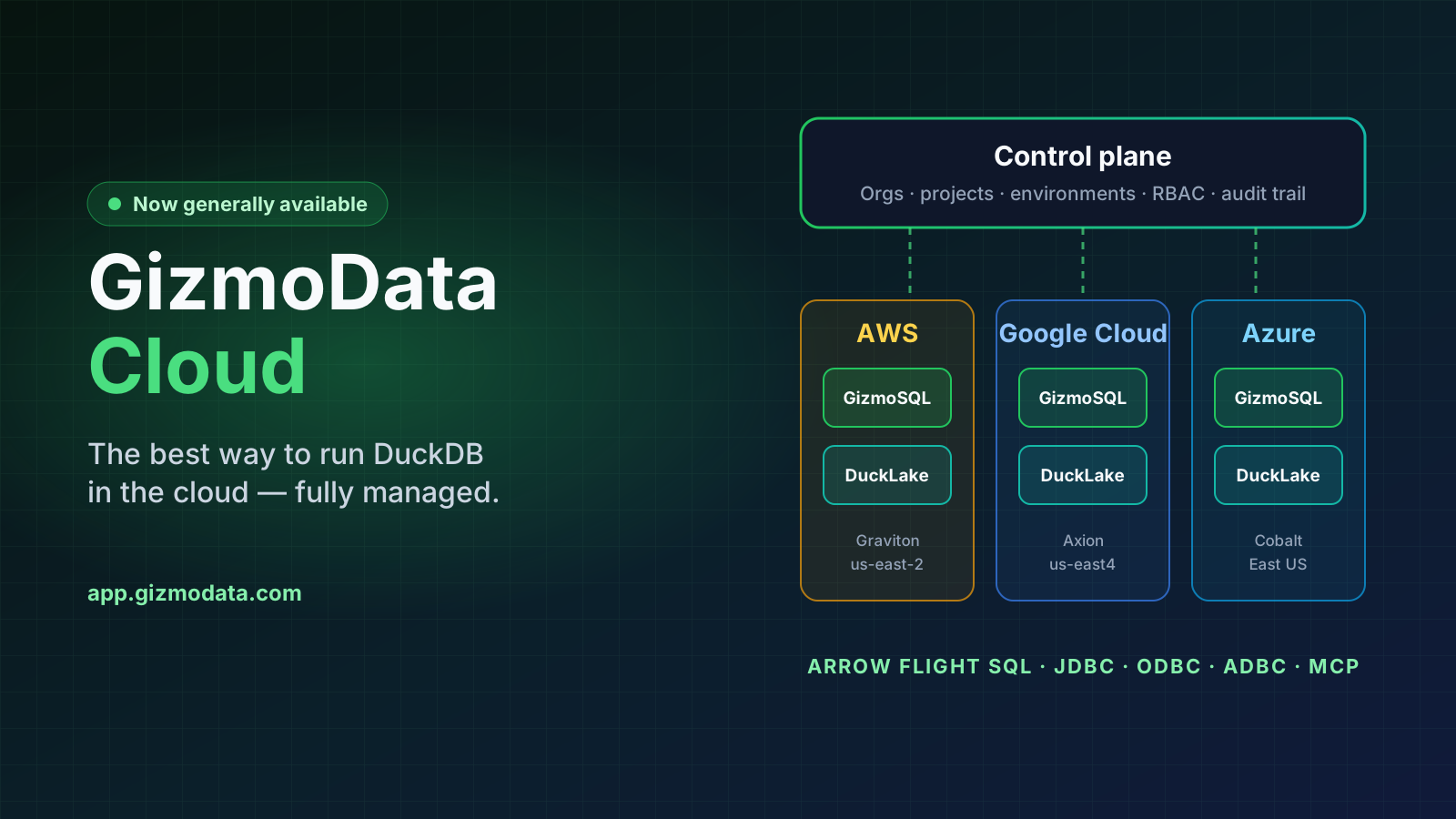
GizmoData Cloud is generally available and open to public sign-up at app.gizmodata.com. It is fully managed GizmoSQL: DuckDB's speed served over Apache Arrow Flight SQL, with the machines, storage, catalogs, credentials and scaling handled for you. Sign up with Google, Microsoft, Apple or GitHub, create your organization, pick a region and launch a cluster, then connect from JDBC, ODBC, Python ADBC, SQLAlchemy, Ibis, PySpark or an AI assistant over MCP.
Clusters run on the latest Arm compute each cloud offers (AWS Graviton 5 and Graviton 4, Google Axion and Azure Cobalt 100) with local NVMe SSD. At launch, self-serve organizations run in AWS US East 2, Google Cloud us-east4 and Azure East US. DuckLake catalogs can be shared across clusters, 14 bundled ADBC drivers let you ATTACH Snowflake, Oracle, BigQuery, Databricks and more and join them live against your lakehouse, and organizations, projects and environments carry Admin, Writer and Reader roles and an audit trail.
Self-serve plans are prepaid: Starter at $29/month (up to 8 vCPUs running at once), Team at $99/month (32 vCPUs) and Business at $499/month (128 vCPUs). Every dollar of the plan fee comes back as compute credit, and managed storage is $0.05 per GB-month. For launch, the first 20 sign-ups who enter LAUNCH25 as their Signup Invite Code get $25 of trial credit and can start without a credit card.
What GizmoData Cloud Brings
Three Clouds, One Control Plane
GizmoSQL clusters on AWS, Google Cloud and Azure, all managed from app.gizmodata.com, with a priced machine menu that shows the hourly cost before you create a cluster.
DuckLake Catalogs
Open lakehouse catalogs on GizmoData-managed storage or your own bucket, mountable to any number of clusters. Public TPC-H catalogs are ready to query.
Federated Queries
Clusters bundle 14 ADBC drivers. Store a secret, ATTACH Snowflake, Oracle, BigQuery, Databricks or Postgres, and join it against DuckLake in one query.
$25 Launch Credit, No Card
The first 20 sign-ups with code LAUNCH25 start free, with no credit card until the credit is used up.

GizmoSQL v1.39.0: Prometheus Metrics and Eager DDL/DML Execution
GizmoSQL v1.39.0 adds Enterprise metrics: an opt-in Prometheus /metrics endpoint and a gizmosql_metrics() SQL table function that read the same registry. Query rates, error classes, and duration histograms by statement kind; sessions by state; queue depth, wait time, and rejections; DuckDB memory and spill; process CPU, memory, threads, and file descriptors; database and WAL size; license and TLS certificate expiry; and an unclean-exit marker so a crash is visible on the next start. Collection runs on a background thread, off the query path, and the release ships a Grafana dashboard, Prometheus alert rules, and a Kubernetes PodMonitor to get from zero to a working board in minutes. Metrics are licensed through a separate metrics entitlement, included in every Enterprise and trial license issued from today.
The other headline is correctness. Under Arrow Flight SQL, a statement submitted through the query path used to execute only when the client fetched its result, so a driver that never read the result of an INSERT could silently drop the write. v1.39.0 executes every statement without a result set (DDL, DML, COPY, ATTACH, transaction control, SET, and more) when the client requests execution, caches the outcome, and replays it on fetch, so a write happens exactly once whether or not its result is ever read. Prepared DDL/DML now advertises an empty result schema so JDBC drivers select the update path and report affected-row counts correctly. Both released ADBC drivers and both released JDBC drivers pass the compatibility suite unmodified.
Also in this release: bulk ingest is logged at INFO with the caller, the fully qualified target table, and the ingested row count; server-wide locks are held only for map updates, never across DuckDB work; the remaining same-session data races (cancel handle, per-session SET-able settings, tags) are closed with lock-free atomics; queued statements honor client cancellation before taking a slot; and Core rejects external tokens carrying catalog restrictions it cannot enforce. A formatting, lint, and clang-tidy gate now runs in CI.
What v1.39.0 Brings to GizmoSQL
Prometheus /metrics Endpoint
Opt-in HTTP listener (default port 9091, address configurable) exposing query, session, queue, DuckDB, process, storage, and expiry metrics in Prometheus text format. Set the port to zero to keep SQL-only access with no listener.
gizmosql_metrics() in SQL
The same measurements as a table function, so any SQL client, dashboard, or agent can read server health without touching HTTP.
Grafana Dashboard & Alert Rules
A ready-made dashboard, Prometheus alert rules (error rate, queue saturation, memory, unclean exit, expiring license or certificate), and a Kubernetes PodMonitor ship in the repo.
Eager DDL/DML Execution
Statements without a result set execute when execution is requested and replay a cached result on fetch, so a write is never lost or repeated, regardless of driver behavior.

Chris Wones Joins GizmoData as Strategic Advisor
Chris Wones has joined GizmoData as Strategic Advisor. Over a 34-year career he has led data and technology initiatives at James River, Retek, dunnhumby, and Kroger/84.51°, helping some of the largest retail and consumer organizations in the world rethink how they collect, manage, and use data. In 2014 Oracle named him its Data Warehouse & Big Data Leader of the Year for the Americas.
Chris and founder Philip Moore go back years: both spent a long stretch of their careers inside the Kroger, 84.51°, and dunnhumby data organizations, Chris as an engineering executive and Philip as the database engineer underneath. That shared history is exactly why this matters. Chris has spent three decades on the buying and operating side of enterprise data platforms, and he knows first-hand what it takes for a new engine to earn a place in production.
In his advisory role, Chris will help shape GizmoData's enterprise data strategy and how GizmoSQL and GizmoData Cloud reach the organizations whose problems he has spent his career solving from the inside. Outside of data, he is an Ironman triathlon finisher, which tells you something about how he approaches long, hard problems.
Why It Matters
34 Years in Enterprise Data
Data and technology leadership at James River, Retek, dunnhumby, and Kroger/84.51°, from the early data-warehouse era through modern cloud platforms.
Oracle Excellence Award, 2014
Named Oracle’s Data Warehouse & Big Data Leader of the Year for the Americas, recognizing enterprise-scale analytics leadership.
Former Engineering Executive
Ran engineering organizations responsible for the data platforms that large retailers and consumer brands depend on every day.
The Buyer’s-Side View
Decades of evaluating, buying, and operating enterprise data platforms, now applied to how GizmoSQL and GizmoData Cloud earn a place in production.

GizmoSQL MCP Server: Query GizmoSQL from Claude Desktop & Claude Code
gizmosql-mcp is a Model Context Protocol (MCP) server and Claude Desktop extension for GizmoSQL, the Apache Arrow Flight SQL server built on DuckDB. Install it, point it at a GizmoSQL server you can reach from your machine (private networks over VPN included), and Claude Desktop, Claude Code, or any other MCP client can list catalogs, schemas, and tables, describe a table, explain a query plan, and run parameterised SQL — returning results as a Markdown table plus structured JSON.
It was designed around safely pointing an LLM at real data. The server is read-only by default: a SQL guard only lets reads through unless you explicitly enable writes. Row caps and per-query timeouts are enforced by GizmoSQL itself, credentials never appear in tool output or errors (Claude Desktop keeps them in your OS keychain), and the server touches no filesystem or network endpoint other than the GizmoSQL host you configure. For a hard boundary, connect with a GizmoSQL JWT carrying the readonly role — or per-catalog permissions on GizmoSQL Enterprise.
Up to three servers can be configured in the Claude Desktop extension, and any number via environment variables; every tool takes an optional connection argument, so "compare row counts of orders on prod and dev" is one prompt. The same server also listens over Streamable HTTP (with a bearer token) for remote connectors such as Claude.ai. The Claude Desktop bundle (.mcpb) ships the native GizmoSQL ADBC driver for macOS, Linux, and Windows x64, so no Node.js install is required. Free and open source under Apache-2.0.
Highlights
Claude Desktop Extension
A one-click .mcpb bundle with the native driver inside for macOS (Apple Silicon and Intel), Linux (x64 and arm64), and Windows x64. No Node.js install needed.
Claude Code & Any MCP Client
One claude mcp add command, or a stdio server definition with npx -y @gizmodata/gizmosql-mcp. Streamable HTTP transport for remote connectors.
Read-Only by Default
A SQL guard rejects anything that is not a read unless writes are explicitly enabled. Row caps and timeouts are enforced by the GizmoSQL server, not the client.
Several Servers, One Chat
Configure prod, dev, and staging side by side; every tool accepts a connection argument and use_connection switches the default.
Claude Code
claude mcp add gizmosql -e GIZMOSQL_HOST=... -e GIZMOSQL_USERNAME=... -e GIZMOSQL_PASSWORD=... -- npx -y @gizmodata/gizmosql-mcp
The GizmoData ADBC Driver Suite: Oracle, Db2, GizmoSQL & Quack
We shipped pure-Go, pip-installable ADBC drivers for Oracle (no Instant Client), IBM Db2 (no CLI/JCC), and DuckDB's Quack — alongside our flagship GizmoSQL driver. Because they're all Apache Arrow-native, moving a table from Oracle or Db2 into GizmoSQL is a few lines of Python, or a single SQL statement from DuckDB — bidirectionally.
GizmoSQL ADBC Driver 2.0: Go-Powered Core, Every ADBC Language
The GizmoSQL ADBC driver has been rebuilt from the ground up as a Go-based native driver, with the familiar Python package now a thin wrapper on top. Version 2.0 lives in a new repository — github.com/gizmodata/gizmosql-adbc — replacing the archived Python-only 1.x repo. The PyPI package name is unchanged (adbc-driver-gizmosql) and the 2.x API is byte-compatible with 1.x, so upgrading is a one-line pip command.
Because the driver now compiles to a native shared library loaded via the ADBC driver manager, every ADBC-capable language gets the full GizmoSQL experience: OAuth/SSO authentication (browser flow or headless), automatic DDL/DML detection routed through DoPut, INSERT/UPDATE/DELETE ... RETURNING support, the gizmosql:// URI scheme with TLS by default, ADBC connection profiles, bulk ingest, and OpenTelemetry observability — from Python, Go, R, Rust, C#, C/C++, and JavaScript.
The whole GizmoSQL client ecosystem moved with it: dbt-gizmosql, sqlmesh-gizmosql, the qgizmosql QGIS plugin, sqlframe-gizmosql, the @gizmodata/gizmosql-client Node.js client (which powers GizmoSQL UI), and more have all been updated to the 2.0 driver. Read the full story on the blog.
Key Features
One Go Core, Seven Languages
The driver is now a Go-built native shared library loaded via the ADBC driver manager — Python, Go, R, Rust, C#, C/C++, and JavaScript all get identical behavior.
Drop-In Python Upgrade
Same PyPI package name (adbc-driver-gizmosql), byte-compatible API. pip install --upgrade and your existing code keeps working.
OAuth / SSO Everywhere
External identity-provider authentication with a browser flow for interactive use and headless mode for CI — no longer Python-only.
Automatic DDL/DML Detection
CREATE/INSERT/UPDATE/DELETE statements are auto-detected and routed through DoPut for immediate server-side execution, with RETURNING results eagerly materialized.
Python (drop-in upgrade)
pip install --upgrade adbc-driver-gizmosqlGo
go get github.com/gizmodata/gizmosql-adbc/go@latest
GizmoSQL v1.34.0: Upgraded to Apache Arrow 25
GizmoSQL v1.34.0 upgrades its embedded Apache Arrow libraries from 23.0.1 to 25.0.0 — two full Arrow releases in one jump. Arrow is GizmoSQL's entire wire format: every query result travels as Arrow record batches over Arrow Flight SQL, so an Arrow upgrade improves the network layer, the data path, and the security posture of every GizmoSQL deployment at once.
The headline changes: Flight SQL protocol groundwork that lets servers declare at prepare time whether a statement returns a result set (the first step toward client drivers dropping query-vs-update text sniffing), stricter Arrow IPC validation that rejects malformed streams — a hardening win for a network-facing server — a formal, published Arrow security model for handling untrusted data, a refreshed bundled gRPC/protobuf stack at current security patch levels, and ARM64 SVE runtime dispatch that speeds up Arrow's vectorized routines on CPUs like AWS Graviton 3 and 4.
The release also levels up Enterprise session instrumentation: sql_executions now records a full per-query timeline — five timestamps and two durations — so queue wait, engine time, time-to-first-row, fetch phase, and idle-open-cursor time are all derivable by subtraction. Views now expose cluster_id for per-cluster filtering in multi-instance deployments, and a fix makes execution_end_time always consistent with duration_ms.
What Arrow 25 Brings to GizmoSQL
Flight SQL Protocol Groundwork
Servers can now declare at prepare time whether a statement returns a result set (is_update) — the first step toward GizmoSQL client drivers retiring query-vs-update text sniffing for prepared statements.
Hardened Wire Format
Stricter Arrow IPC validation rejects malformed streams and files, and the Arrow project published a formal security model for handling untrusted Arrow data — directly relevant to a network-facing Arrow-native server.
Refreshed gRPC & protobuf Stack
The bundled gRPC and protobuf libraries are updated to current security patch levels, keeping GizmoSQL's network layer up to date.
ARM64 SVE Speedups
Arrow's vectorized routines now use SVE runtime dispatch on capable ARM CPUs — a boost for GizmoSQL's arm64 builds on hardware like AWS Graviton 3 and 4.
Python ADBC Driver v1.2.0: Connection Profiles
adbc-driver-gizmosql v1.2.0 adds support for ADBC connection profiles — reusable TOML files that bundle your GizmoSQL server URI and connection options, so your application code stays clean and credential-free.
Reference a profile by name — connect(profile="gizmosql_dev") or connect("profile://gizmosql_dev") — or by absolute path. Secrets stay out of the file with {{ env_var(...) }} substitution at connect time, and explicit connection parameters always override profile settings, so one-off overrides don't require editing the profile.
Connection profiles are a cross-language ADBC standard (requires adbc-driver-manager 1.11.0+), so the same TOML file that drives your Python code works from any ADBC-capable runtime. For a hands-on walkthrough using GizmoSQL, see Columnar's cookbook tutorial linked below.
Key Features
Reusable TOML Profiles
Bundle the server URI, username, and driver options in one file. Point your code at a profile name instead of hardcoding connection details.
Credential-Free Code
Secrets are substituted from the environment at connect time via {{ env_var(...) }} — nothing sensitive lands in the profile file or your source.
One-Line Environment Switching
Same client code, different profile name: gizmosql_dev for development, gizmosql_prod for production. No code changes to retarget.
Cross-Language ADBC Standard
Profiles follow the ADBC spec (adbc-driver-manager 1.11.0+), so the same file works across ADBC drivers and language runtimes.
Install / Upgrade
pip install --upgrade adbc-driver-gizmosqlProfile File (gizmosql_dev.toml)
profile_version = 1

[Options]
uri = "grpc+tls://gizmosql.example.com:31337"
username = "gizmosql_user"
# Keep secrets out of the file - substituted from the
# environment at connect time
password = "{{ env_var(GIZMOSQL_PASSWORD) }}"
Connect by Profile Name (Python)
from adbc_driver_gizmosql import dbapi as gizmosql

with gizmosql.connect(profile="gizmosql_dev") as conn:
    with conn.cursor() as cur:
        cur.execute("SELECT 1 AS value")
        print(cur.fetch_arrow_table())
Join the New GizmoData Community on Slack
GizmoData just launched a community Slack where GizmoSQL users can talk directly with the founder, swap tips on running DuckDB as an Apache Arrow Flight SQL server, get help, and hear about new releases first. Free to join — everyone welcome.

Philip Moore on the A/I Prosperity Podcast
GizmoData founder Philip Moore joined Torben Andersen on the A/I Prosperity podcast for a wide-ranging conversation on GizmoSQL, running DuckDB as an enterprise-grade Apache Arrow Flight SQL server, and cutting cloud data-warehouse costs.

GizmoSQL Is Now a Built-In DBeaver Driver
As of the 26.1.0 release, GizmoSQL ships as a native, built-in driver in DBeaver — the world's most popular database GUI, with millions of users. There's no manual JDBC setup, no hunting for a JAR, and no driver configuration: open DBeaver, create a new connection, pick GizmoSQL from the driver list, enter your host, port, and credentials, and start querying. The driver speaks Arrow Flight SQL to your GizmoSQL server, so you get the same high-performance, columnar transport you'd get from any other GizmoSQL client — now from a polished, full-featured SQL IDE. Because the driver is bundled and maintained upstream in DBeaver itself, it stays current automatically with every DBeaver release.
What You Get
Built-In Driver
GizmoSQL is bundled directly in DBeaver — select it from the driver list when creating a connection. No download, no JAR, no classpath.
Zero JDBC Setup
Skip manual driver installation and configuration. Enter your host, port, and credentials in the connection dialog and you're querying.
Arrow Flight SQL Transport
The driver connects over Apache Arrow Flight SQL, giving you GizmoSQL's high-performance columnar data transport straight into DBeaver.
Full SQL IDE
Browse schemas, edit and run SQL, view results, and manage your GizmoSQL data with DBeaver's rich, mature database GUI.

Experimental Quack JDBC Driver
quack-jdbc is a new experimental JDBC driver for DuckDB's Quack remote protocol — the native client-server protocol DuckDB Labs shipped in May 2026, stabilizing with DuckDB v2.0 in September 2026.
Point any JDBC-compatible tool (DBeaver, IntelliJ DataGrip, dbt, Spark) at a jdbc:quack://host:9494 URL and it just works — the driver implements the full DatabaseMetaData surface and decodes DuckDB DataChunk vector encodings (FLAT, CONSTANT, DICTIONARY, SEQUENCE).
Status is alpha; expect breaking changes before v2.0. FSST decoding, nested java.sql.Array/Struct wrapping, and native server-side parameter binding are on the roadmap.
Key Features
jdbc:quack:// URLs
Connect any JDBC tool with a standard URL: jdbc:quack://host[:9494]. Auth token and other options pass via Properties or URL parameters.
JVM Tool Compatible
Works with DBeaver, IntelliJ DataGrip, dbt-duckdb-style workflows, and JVM data-engineering frameworks like Spark out of the box.
Full DatabaseMetaData
Catalog, schema, table, view, column, key, and index metadata — so IDE schema browsers and SQL tools light up immediately.
DataChunk Vector Decoding
Decodes DuckDB DataChunk vector encodings: FLAT, CONSTANT, DICTIONARY, and SEQUENCE. (FSST and native parameter binding are roadmap items.)
Install from Maven Central
<dependency>
  <groupId>com.gizmodata</groupId>
  <artifactId>quack-jdbc</artifactId>
  <version>0.1.0-alpha.1</version>
</dependency>Experimental ADBC Driver for Quack
adbc-driver-quack is a new experimental Apache Arrow ADBC driver for DuckDB's Quack remote protocol — zero-copy Arrow RecordBatches from the server's columnar engine all the way to your client's Arrow-native runtime.
Run standard ADBC queries and pull results as Arrow tables, or stream large results with bounded memory via fetch_record_batch(). Bulk ingest is supported through Statement.BindStream → APPEND_REQUEST.
The recommended choice when you want zero-copy Arrow end-to-end, or a Quack client from a non-JVM runtime like Python, Go, Rust, or R. Requires a Quack server (DuckDB v1.5.2+ with the Quack extension). Status is alpha (v0.1.0-alpha.1).
Key Features
Zero-Copy Arrow End-to-End
Results arrive as Apache Arrow RecordBatches — no row-by-row materialization, no intermediate copies between the DuckDB server and your client runtime.
Python & Go Clients
pip install adbc-driver-quack for Python, or go get github.com/gizmodata/adbc-driver-quack for Go. The same ADBC surface lights up Rust and R too.
Streaming with Bounded Memory
Pull large result sets one batch at a time via fetch_record_batch() — perfect for analytics pipelines that won’t fit in RAM.
Standard ADBC Bulk Ingest
Load data fast with Statement.BindStream → APPEND_REQUEST. Autocommit by default; explicit transactions when you need them.
Install (Python)
pip install adbc-driver-quackInstall (Go)
go get github.com/gizmodata/adbc-driver-quack@latestExample Usage (Python)
import adbc_driver_quack.dbapi as quack

with quack.connect(
    uri="quack://localhost:9494",
    db_kwargs={"adbc.quack.token": "my-secret-token"},
) as conn, conn.cursor() as cur:
    cur.execute("SELECT 42 AS answer")
    table = cur.fetch_arrow_table()
GizmoSQL Now Has a Python Library
The new gizmosql Python library lets you spin up a real GizmoSQL server — same engine as the CLI, same Arrow Flight SQL protocol — directly from Python. The Server() context manager launches a managed subprocess on an auto-picked free port and downloads the matching server binary on first use into ~/.cache/gizmosql/, so there's nothing to install ahead of time. The most common use is a session-scoped pytest fixture: every test gets its own real Flight SQL endpoint with no port collisions across pytest-xdist workers. It's equally at home in notebooks, multi-agent workflows, and quick local demos. Install with 'pip install gizmosql[adbc]' (the [adbc] extra adds the ADBC Flight SQL client so Server.connect() works in-process). Stable and LTS channels are both supported via the channel kwarg. Requires Python 3.10+ and runs on macOS arm64, Linux amd64/arm64, and Windows amd64.
Why a Python Library?
One-Line pip Install
pip install gizmosql[adbc] — the [adbc] extra adds the Flight SQL client so Server.connect() works in-process. Drop it for a smaller install.
Server() Context Manager
A real GizmoSQL server in a managed subprocess on an auto-picked free port. The matching server binary downloads on first use.
pytest Fixture Ready
Drop into conftest.py for a session-scoped fixture — every test gets a real Flight SQL endpoint, no port collisions across pytest-xdist workers.
Stable & LTS Channels
Pass channel="lts" to download the LTS server build instead. Same Python API, same protocol — the channel just controls which DuckDB pin runs underneath.
Introducing the GizmoSQL LTS Channel
GizmoSQL now ships in two parallel release channels — Stable and LTS — that share the same GizmoSQL feature set and only differ in which DuckDB release is bundled. The Stable channel tracks the latest DuckDB minor for every new feature, type, and performance improvement on its normal cadence. The LTS channel tracks the most recent DuckDB LTS for production deployments where the underlying database's stability guarantees matter more than new features. Both channels get every GizmoSQL fix, feature, and quality-of-life improvement at the same time — choosing LTS only changes which DuckDB version is statically linked into the binary. The CLI flags, library API, configuration, authentication, and protocol behavior are identical, and the two builds install side-by-side via Homebrew, Docker, and MSI.
Why LTS?
Tracks DuckDB LTS Releases
Pinned to the most recent DuckDB LTS (e.g. v1.4.4) for production deployments. The pin advances when DuckDB names a new LTS.
Side-by-Side With Stable
LTS binaries, images, and packages carry an _lts / -lts suffix so they coexist with Stable on the same machine, registry, or download index.
Identical GizmoSQL API
Same flags, env vars, library API, authentication, and Arrow Flight SQL protocol. Switching channels is a binary swap and a restart.
Homebrew, Docker & MSI
Install via gizmodata/tap → gizmosql-lts, gizmodata/gizmosql-lts on Docker Hub / GHCR, or the LTS MSI on Windows. iOS remains stable-only.

qgizmosql: New QGIS Plugin for GizmoSQL
qgizmosql is a new QGIS plugin that lets you browse and visualize spatial data from a GizmoSQL server directly in QGIS — no raw DuckDB file required. The plugin is being forked from QDuckDB (Oslandia, GPLv2+) with its DuckDB embedded-file connection layer swapped for the adbc-driver-gizmosql client, which speaks Arrow Flight SQL to a remote (or local) GizmoSQL server. Connect, pick a table with a geometry column, and add it as a QGIS layer streamed via Arrow record batches — with feature requests (filters, bbox, attribute selection) pushed down to GizmoSQL as SQL.
Key Features
Arrow Flight SQL Transport
Connects to GizmoSQL via gRPC + TLS using adbc-driver-gizmosql — no local DuckDB file required. Layers stream as Arrow record batches.
Remote & Multi-User
Unlike QDuckDB, qgizmosql talks to a remote GizmoSQL server, so multiple GIS users can analyze the same live dataset concurrently.
Password or OAuth / SSO
Authenticate with username/password or full browser-based OAuth/SSO flows — including enterprise identity providers.
Server-Side Spatial Engine
GEOMETRY types and 100+ DuckDB spatial functions execute server-side on GizmoSQL. Filters and bboxes are pushed down as SQL.
Install from the official QGIS plugin repository — in QGIS go to Plugins → Manage and Install Plugins…, search for qgizmosql, and click Install.

GizmoSQL Now Available on the Apple App Store
GizmoSQL is now live on the Apple App Store for iPhone and iPad. You can spin up a real Arrow Flight SQL server — powered by DuckDB — right from your pocket. It's ideal for development, experimentation, demos, and learning Arrow Flight SQL on the go. It is not intended for production workloads, but the fact that the same GizmoSQL engine runs on iOS shows just how flexible it is: from cloud VMs and Kubernetes to Windows, macOS, and now iPhone and iPad.
What You Get
Real Arrow Flight SQL Server
Runs the same GizmoSQL engine as desktop and cloud — complete with Arrow Flight SQL endpoints and DuckDB-backed query execution.
Runs on iPhone & iPad
From cloud VMs to Kubernetes to the device in your pocket — GizmoSQL is incredibly flexible about where it runs.
Perfect for Development & Learning
Prototype queries, test client integrations, and explore Arrow Flight SQL without standing up any infrastructure. Not intended for production workloads.
One-Tap Install
Download directly from the Apple App Store — no Docker, no provisioning, no config files. Just launch and start querying.
GizmoSQL Grafana Plugin Now Available on Grafana Marketplace
The GizmoSQL data source plugin for Grafana is now officially listed on the Grafana Marketplace. Connect Grafana directly to GizmoSQL using the Arrow Flight SQL protocol for high-performance observability dashboards powered by DuckDB. Install it from the Grafana catalog with a single click and start building real-time dashboards over your GizmoSQL data.
Key Features
Official Grafana Marketplace Listing
Install directly from the Grafana plugin catalog — no manual builds or sideloading required.
Arrow Flight SQL Protocol
High-throughput, columnar data streaming from GizmoSQL to Grafana using Apache Arrow Flight SQL.
Real-Time Dashboards
Build live dashboards and alerts over your GizmoSQL data with full SQL query support.
Secure Authentication
Supports username/password and token-based authentication for secure access to your data.

GizmoSQL Now Available for Windows x64
GizmoSQL is now available as a native Windows installer (MSI) for x64 systems. Windows users can now run terabyte-scale analytics locally or on Windows Server infrastructure — at a fraction of the cost of cloud data warehouses like Snowflake, Databricks, or BigQuery. The MSI installer provides a seamless setup experience with full support for GizmoSQL's Arrow Flight SQL engine, DuckDB-powered query execution, and all the connectors your BI and AI tools already use.
What's Included
Native Windows Installer
One-click MSI installer for Windows x64. No Docker, no WSL — runs natively on Windows 10/11 and Windows Server.
Terabyte-Scale Analytics
Process terabytes of data with GizmoSQL's high-performance DuckDB engine, right on your Windows infrastructure.
90% Cost Savings
Run the same TPC-H workloads for a fraction of the cost compared to Snowflake, Databricks SQL, or BigQuery.
Full Connector Support
Works with JDBC, ODBC, Python ADBC, Power BI Connector, and all Arrow Flight SQL-compatible tools.

GizmoSQL Power BI Connector Now Available
The GizmoSQL Power BI Connector lets you connect Microsoft Power BI directly to GizmoSQL using the Arrow Flight SQL protocol. Build interactive dashboards, reports, and data visualizations powered by GizmoSQL's high-performance query engine — no intermediate data exports needed.
Key Features
DirectQuery Support
Run live queries against GizmoSQL without importing data. Your dashboards always reflect the latest data.
Hierarchical Navigation
Browse databases, schemas, and tables in the Power BI Navigator pane with intuitive drill-down.
Query Folding
Power BI pushes filters, joins, and aggregations down as SQL — including LIMIT/OFFSET, CAST, and SQL-92 expressions.
Flexible Authentication
Supports username/password, token-based, and OAuth (browser) authentication methods.
Signed Connector
The .pqx connector is code-signed for integrity verification, ensuring a secure and trusted installation.
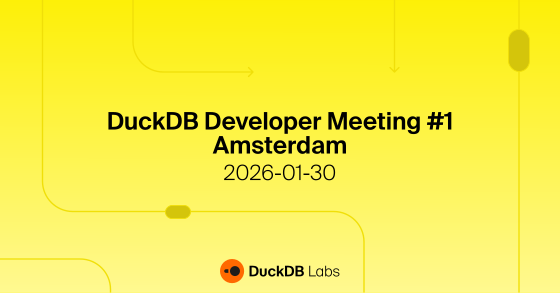
Philip Moore Spoke at DuckDB Developer Meeting #1
GizmoData founder Philip Moore spoke at the inaugural DuckDB Developer Meeting in Amsterdam. This event focused on extension development and building sophisticated applications atop DuckDB, concentrating on the C API, extension template, and internals.
Event Schedule
| 9:30–12:00 | Extension Development Workshop | Rusty Conover (Query.Farm) |
| 15:30 | Venue opens | |
| 16:00 | Extension building in DuckDB | Sam Ansmink (DuckDB Labs) |
| 16:25 | Storage and encryption in DuckDB | Lotte Felius (DuckDB Labs) |
| 17:10 | DuckPL: A procedural language in DuckDB | Denis Hirn (University of Tübingen) |
| 17:35 | GizmoEdge: A distributed DuckDB engine for IoT GizmoData | Philip Moore (GizmoData) |
| 18:00 | Drinks and snacks | |
| 19:30 | Event ends |
Attendance is complimentary; Eventbrite registration required
Separate registration needed for the morning workshop (via Luma)
Venue is wheelchair-accessible with public transit and parking options
GizmoSQL Enterprise Edition Now Available
GizmoSQL Enterprise Edition is now available, bringing advanced features for production deployments. Built on top of the open-source Core edition, the Enterprise Edition adds session instrumentation and administrative controls for enterprise environments.
Enterprise Features
OAuth / SSO Authentication
Enterprise single sign-on support with OAuth 2.0. Integrate with your existing identity provider for seamless, secure access.
Session Instrumentation
Track server instances, client sessions, SQL statements, and query executions. Records are stored in DuckDB for analysis and auditing with views like active_sessions, session_activity, and session_stats.
KILL SESSION Command
Terminate active client sessions via SQL with KILL SESSION '<session-id>'. Requires admin role. Useful for terminating runaway queries or rogue connections.
Catalog-Level Permissions
Fine-grained access control with per-catalog read/write permissions via JWT token claims. Control which databases users can access and modify.
Includes All Core Features
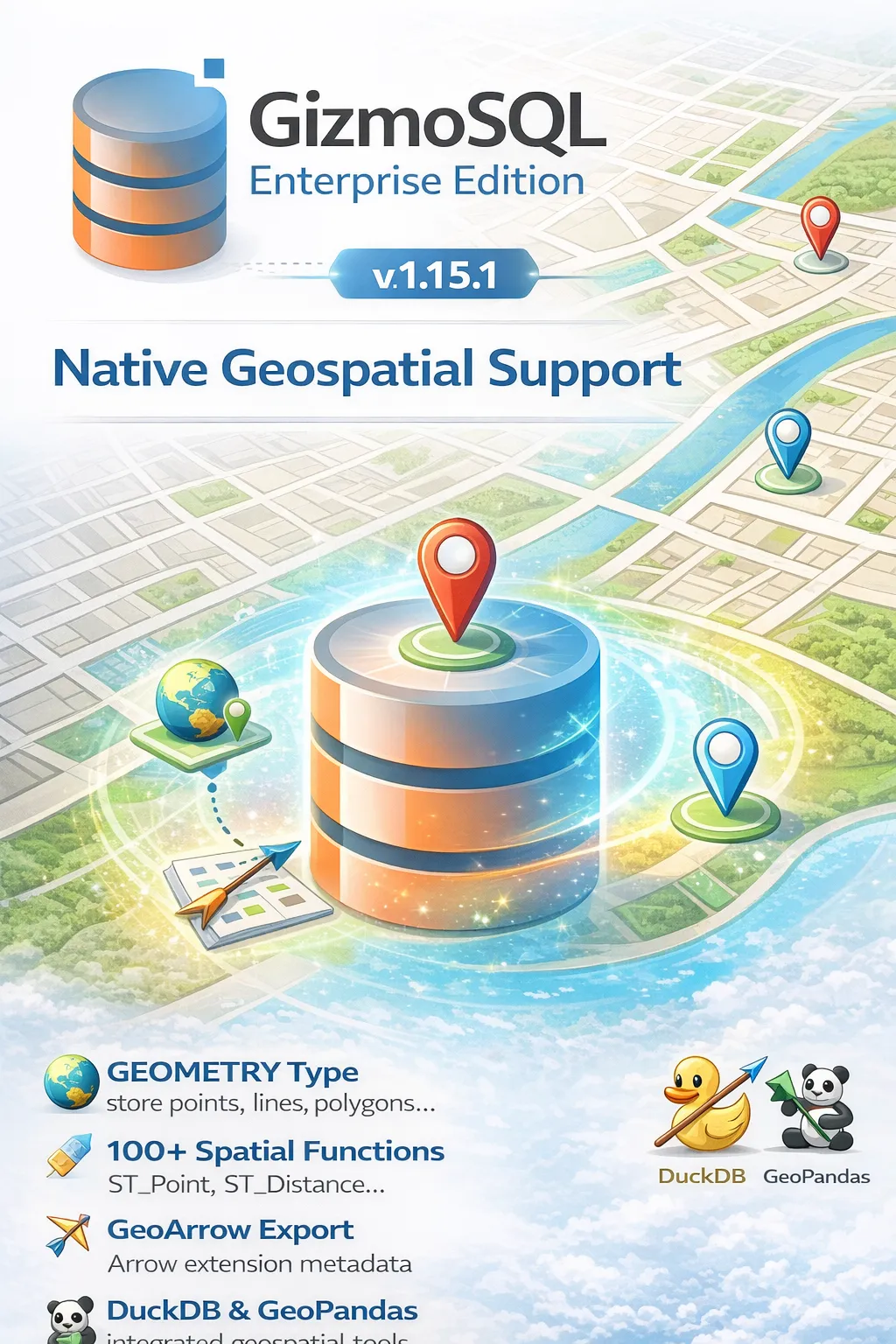
GizmoSQL v1.15.1: Native Geospatial Support
GizmoSQL now includes built-in support for geospatial data! DuckDB's SPATIAL extension loads automatically at server startup with no configuration required.
Geospatial Features
GEOMETRY Type Support
Store points, lines, polygons, and more complex geometries natively in your database.
100+ Spatial Functions
Full suite of spatial functions including ST_Point, ST_Distance, ST_Contains, ST_Buffer, and many more.
GeoArrow Export
Geometry columns export with proper Arrow extension metadata for seamless interoperability.
GeoPandas Integration
Read geometry data directly into GeoPandas—no WKB conversion needed.
Example Usage
cur.execute("SELECT * FROM my_spatial_table")
gdf = gpd.GeoDataFrame.from_arrow(cur.fetch_arrow_table())
# That's it!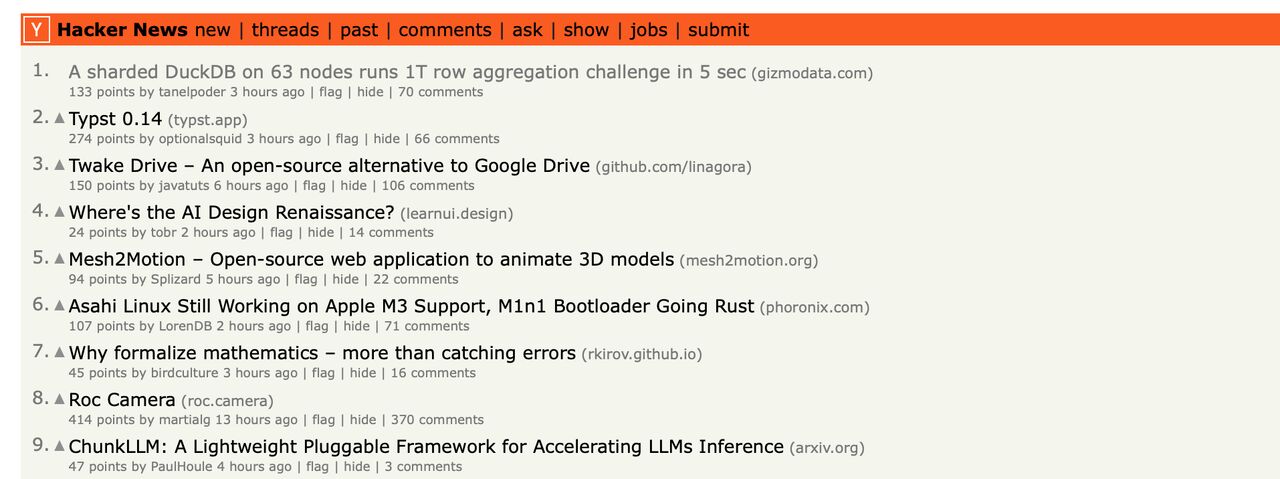
GizmoEdge Hits #1 on Hacker News
On October 24, 2025, GizmoEdge took the #1 spot on Hacker News. The story — "A sharded DuckDB on 63 nodes runs 1T row aggregation challenge in 5 sec" — was submitted by Tanel Poder, one of the most respected names in database performance engineering, and linked to our One Trillion Row Challenge write-up.
The result that earned the front page: GizmoEdge sharded a one-trillion-row dataset across 63 DuckDB worker nodes and ran the full aggregation challenge in about five seconds, end to end. The thread drew 224 points and a 136-comment technical discussion on distributed DuckDB, sharding strategy, and what commodity hardware can really do.
Reaching #1 on Hacker News — the front page read daily by millions of engineers — is validation from the hardest crowd there is. No ad spend, no launch coordination: just a benchmark result interesting enough that the internet's most skeptical technical audience voted it to the top.
Why It Matters
#1 on the Front Page
GizmoEdge held the top spot on Hacker News — ahead of hundreds of competing stories that day.
224 Points, 136 Comments
A deep technical discussion among distributed-systems and database engineers — not a marketing echo chamber.
Submitted by Tanel Poder
The story was posted by Tanel Poder, a world-renowned database performance expert — independent validation of the result.
1 Trillion Rows in ~5 Seconds
The underlying feat: 63 sharded DuckDB worker nodes aggregating a trillion rows in about five seconds.