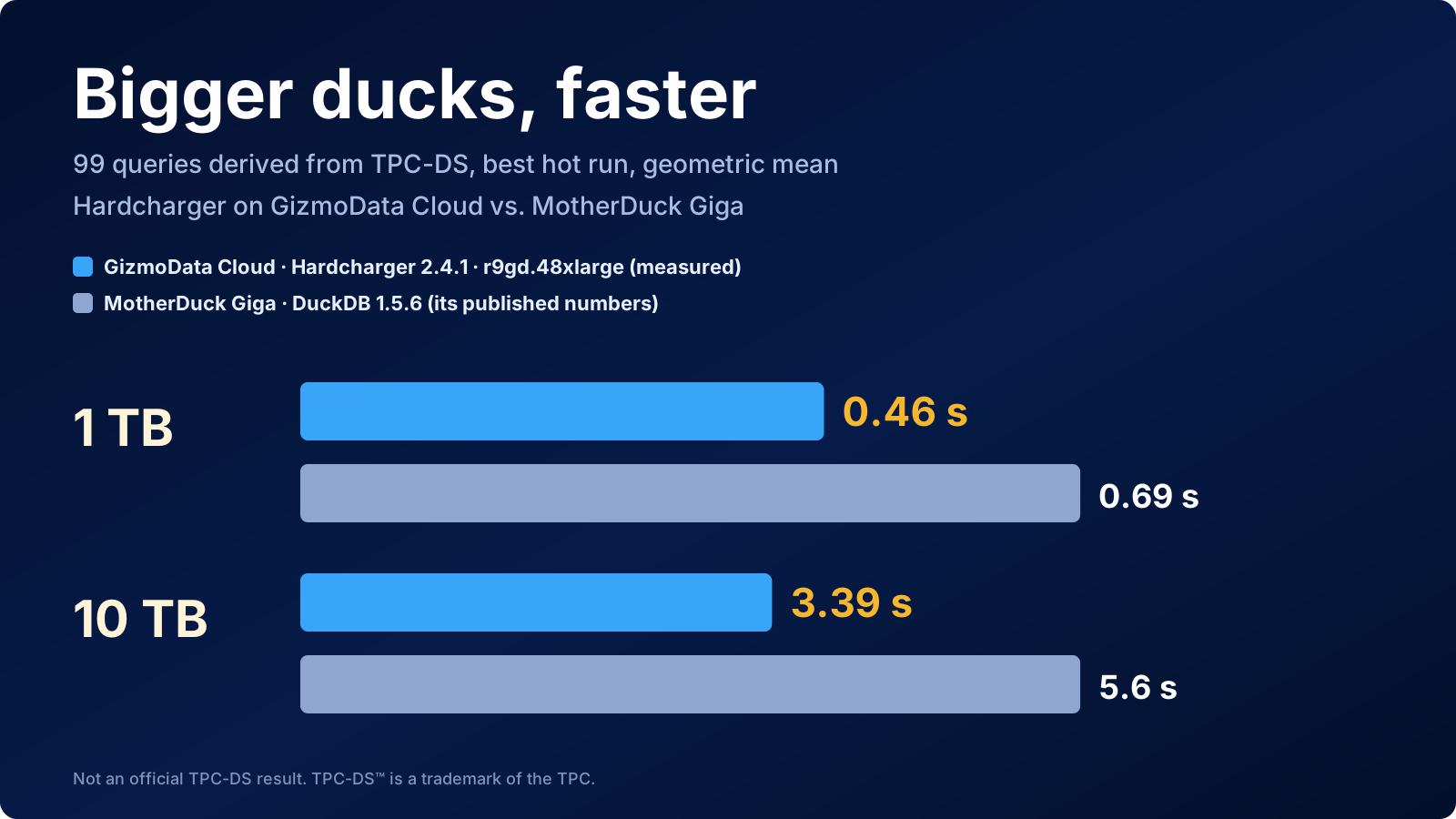
MotherDuck recently published Bringing the Big Ducks, a benchmark of its largest instance, the Giga, which it describes as "the better part of an instance with 192 cores and 1.5 TB of RAM". On the 99 queries of TPC-DS it posted a geometric mean of 0.69 seconds at 1 TB and 5.6 seconds at 10 TB, and lined those up against published numbers for Redshift, Snowflake, Databricks, BigQuery and Synapse. It's a good post with a clear method, and we like a challenge.
So we took it. One small, self-funded company. One product that is less than two weeks old: Hardcharger, our open-source DuckDB 2.0 server, launched on October 21. One machine on GizmoData Cloud, the same class MotherDuck used: an AWS Graviton5 r9gd.48xlarge with 192 vCPUs, 1.5 TB of memory and local NVMe. The same 99 queries, run exactly the way MotherDuck ran them.
Hardcharger finished with a geometric mean of 0.463 seconds at 1 TB and 3.39 seconds at 10 TB. That's 1.5 times as fast as MotherDuck's Giga at 1 TB and 1.65 times as fast at 10 TB, and faster than every system in MotherDuck's post: Amazon, Snowflake, Databricks, Google, Microsoft, and Oracle's MySQL HeatWave too. All 99 queries returned results at both scales, and the same work costs less on GizmoData Cloud than on the Giga.
The results
Each number is the geometric mean of the 99 queries' best hot times, in seconds (lower is faster). That is MotherDuck's method: one cold run that isn't scored, then the best of three hot runs per query, timed at the client and including fetching the results.
| 1 TB (SF1000) | 10 TB (SF10000) | |
|---|---|---|
| GizmoData Cloud, Hardcharger 2.4.1 | 0.463 s | 3.39 s |
| MotherDuck Giga | 0.690 s | 5.6 s |
| MotherDuck Mega | 2 s | – |
| MySQL HeatWave | – | 5 s |
| Amazon Redshift | 4.20 s | 8 s |
| Snowflake | 4.90 s | 13 s |
| Databricks | 5.95 s | – |
| Google BigQuery | 6.11 s | 20.2 s |
| Azure Synapse | 9.15 s | 22.9 s |
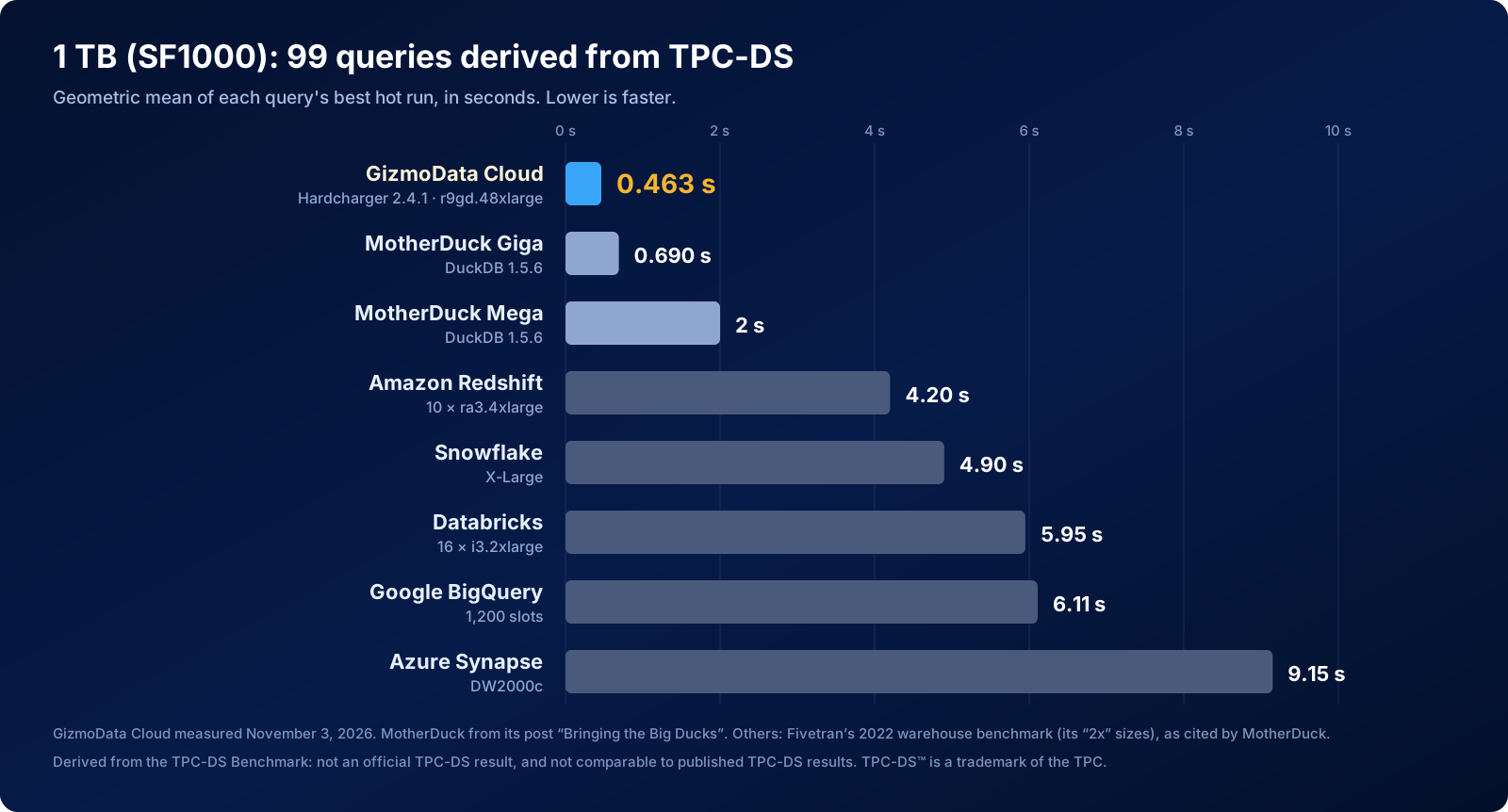
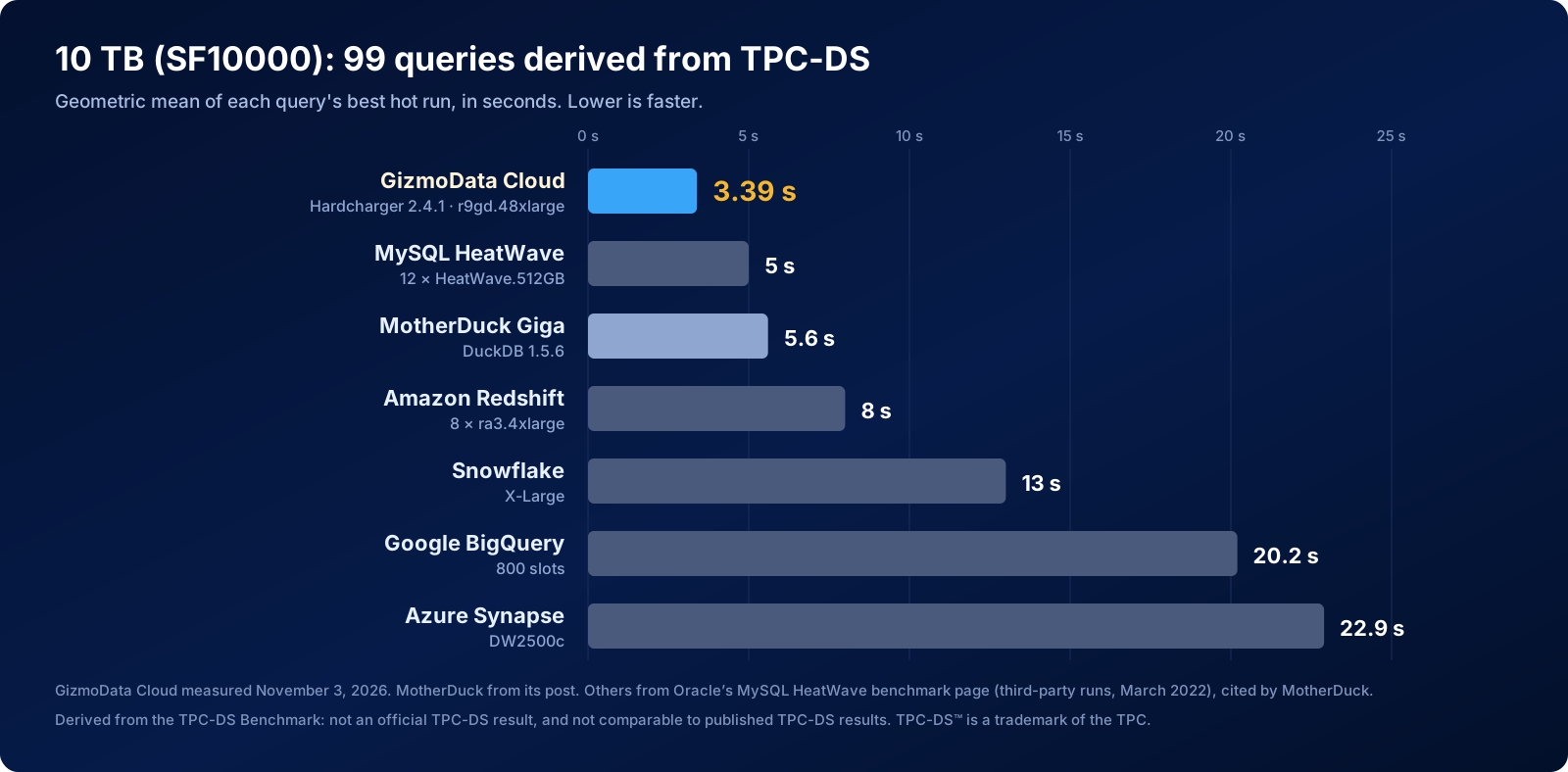
Where the other numbers come from: MotherDuck's are from its post. As in its post, the 1 TB numbers for the other systems are from Fivetran's 2022 warehouse benchmark, at the sizes it calls "2x": Redshift on 10 ra3.4xlarge nodes, a Snowflake X-Large, Databricks on 16 i3.2xlarge workers, 1,200 BigQuery slots and Synapse DW2000c. (MotherDuck's post labels the Snowflake result "2XL"; in Fivetran's data the 2x Snowflake size is X-Large.) The 10 TB numbers are from Oracle's MySQL HeatWave benchmark page, which reports third-party runs from March 2022: Redshift on 8 ra3.4xlarge nodes, a Snowflake X-Large, 800 BigQuery slots and Synapse DW2500c. That page also has Oracle's own HeatWave result, 5 seconds on 12 HeatWave.512GB nodes. MotherDuck's post names Redshift (8 seconds) as the fastest of the others and doesn't mention HeatWave, so we added it.
Every engine on that list has very likely got faster since 2022, as MotherDuck itself points out. The comparison with MotherDuck is the like-for-like one: the same queries, the same method and the same class of machine.
A small team, a new product, and some serious contenders
Look at who is on that chart. Amazon, Google, Microsoft and Oracle build the clouds themselves. Snowflake and Databricks are two of the biggest names in data, with thousands of engineers between them. MotherDuck is a well-backed team we respect, running DuckDB on its own biggest hardware. And on the top line sits a bootstrapped startup with a product it launched on October 21.
That isn't luck, and it isn't magic. It's a bet we made early: don't build a new engine, put the best one on the network and get out of its way. DuckDB is the fastest analytical engine most teams have ever used. Hardcharger turns it into a real server, with access control, single sign-on, mTLS, audit logs and a fast Arrow-native protocol, all included, and GizmoData Cloud runs it on the newest hardware each cloud sells, at a price you see before you click Create. When DuckDB gets faster, you get faster the same day. When AWS ships a faster chip, it shows up as a new size. Nobody has to re-platform.
That is why a team our size can line up against these names and come out in front. You don't need a warehouse that bills by the credit to run 99 hard queries over 10 TB in a few seconds each. You need one good machine and the right engine on it.
Why it's faster
We'd love to take all the credit, but the biggest difference is probably the engine version. MotherDuck ran DuckDB 1.5.6. Hardcharger 2.4.1 runs DuckDB 2.0.0, which had come out the week before MotherDuck's post, and MotherDuck said as much: "I'm also not showing DuckDB in its best light either." On our own three-cloud TPC-H race, the DuckDB 2.0 alpha cut 22% to 31% off the run time on local NVMe with nothing else changed. Much of the credit belongs to the DuckDB team, and getting DuckDB 2.0 into your hands as a production server is exactly the point of Hardcharger. We didn't run DuckDB 1.5.6 on this machine, so we can't say exactly how much of the gap is the engine and how much is the rest.
The rest is the setup. The data sits in a DuckDB database on the machine's own 11 TB of NVMe, not on network storage. The chip is AWS's newest, Graviton5. And we set four engine settings:
SET GLOBAL threads = 191;
SET GLOBAL memory_limit = '1150GiB';
SET GLOBAL preserve_insertion_order = false;
SET GLOBAL enable_external_file_cache = false;
The thread count mattered most. Hardcharger started with 256 threads on a cluster allowed 191 cores, so Kubernetes throttled it; matching the thread count to the cores made the 1 TB run about 4% faster. We'll make that the default. We turned off DuckDB's external file cache because of the load, not the queries: once the cache had filled, our first 10 TB load slowed to a crawl.
We didn't have to guess at any of this: GizmoData Cloud showed us. Every cluster has a Monitoring tab with its CPU cores in use, CPU throttling, memory against the container's limit, network I/O and restarts, and Hardcharger clusters add the engine's own view of statements, latency, sessions, queue and DuckDB memory. Here is our first 1 TB run, at 256 threads:
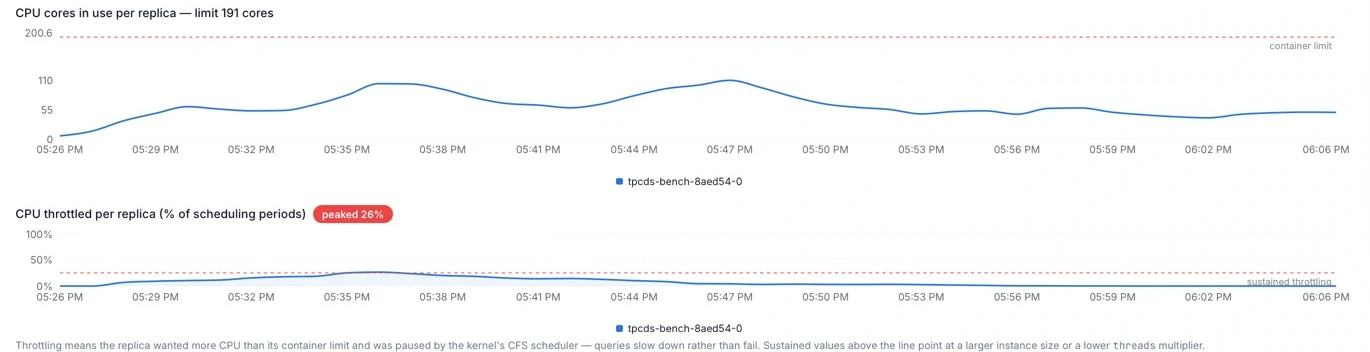
That's a view a managed warehouse doesn't give you. MotherDuck shows query history, timings and whether a Duckling spilled to disk; Snowflake shows warehouse query load, spill and credits. Neither one's documentation describes a way to see the machine's CPU cores, throttling or memory against its limit, so a problem like this one would just look like a slower benchmark.
What it costs
This cluster cost $30.80 an hour on GizmoData Cloud, on demand. MotherDuck lists the Giga at $24.00 an hour in the US, so MotherDuck's hour is cheaper. Ours does more work in an hour, though. Multiplying each geometric mean by the hourly price, the same work costs about 14% less on GizmoData Cloud at 1 TB and about 22% less at 10 TB.
The monthly plans differ too. The Giga is available only on MotherDuck's Business plan, which costs $250 a month on top of usage. On GizmoData Cloud, the monthly plan fee comes back in full as compute credit. Take a team that uses this machine for 20 hours a month: on MotherDuck, that's $250 plus $480 of Giga time, $730 in all. On GizmoData Cloud's Business plan, it's $616 of compute, with the $499 plan fee counted toward it.
| GizmoData Cloud | MotherDuck Giga | |
|---|---|---|
| Hourly price | $30.80 | $24.00 |
| Monthly plan | Fee returned as compute credit | Business plan, $250 a month, not credited |
| Same work, 1 TB | 14% less | – |
| Same work, 10 TB | 22% less | – |
| 20 hours in a month | $616 | $730 |
At 10 TB, the best hot runs of all 99 queries add up to 1,517 seconds, or $12.98 of compute on GizmoData Cloud. Loading the 10 TB from S3 onto the cluster's NVMe took another 14 minutes, about $7.32.
Run DuckDB 2.0 on the newest hardware, in your own region. Start free with $25 of launch credit, applied automatically.
Start free on GizmoData Cloud →Query by query
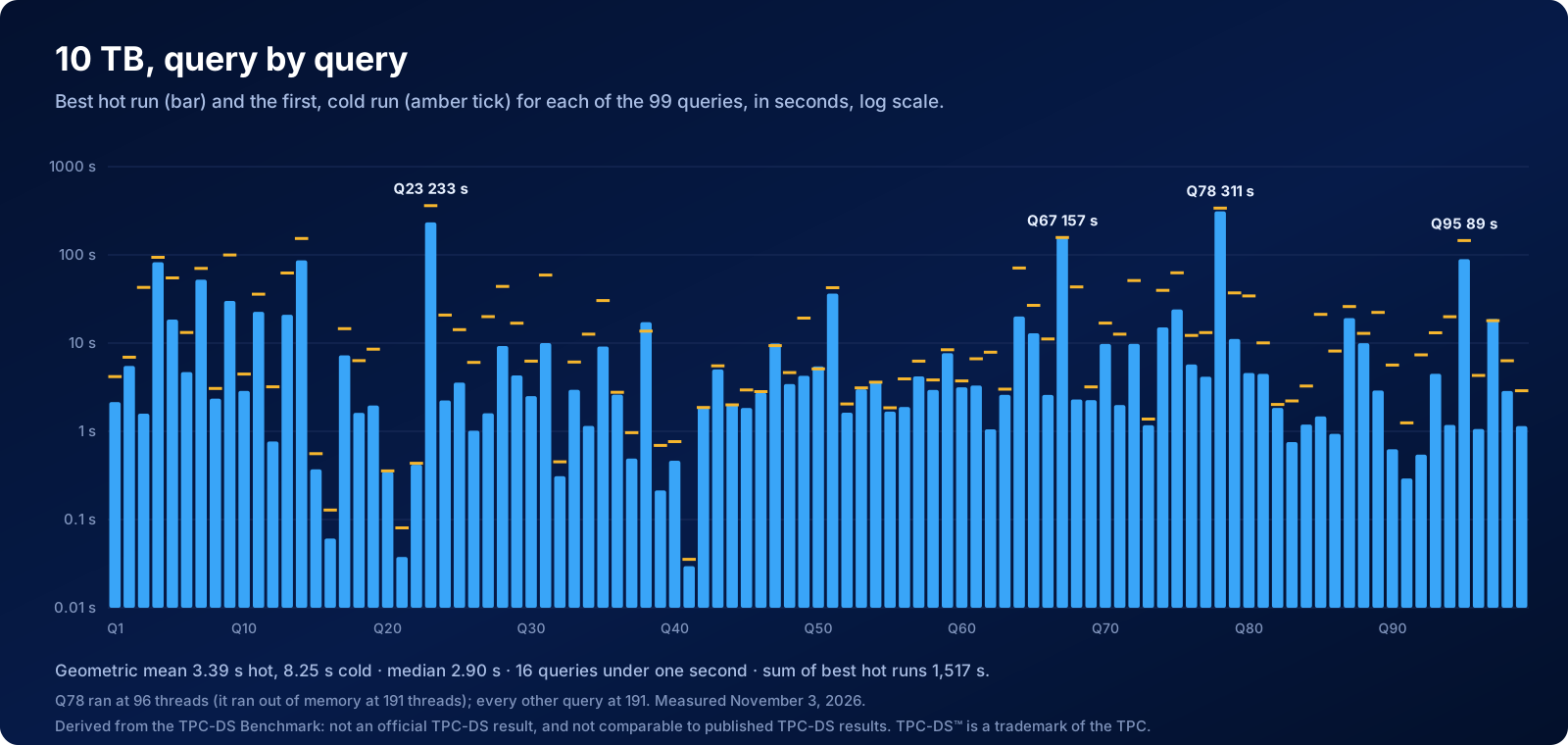
At 10 TB, the median query took 2.9 seconds, and 16 of the 99 finished in under a second. A handful of heavy queries take most of the time: Q78 (311 seconds), Q23 (233), Q67 (157), Q95 (89), Q14 (87) and Q4 (83). At 1 TB, the median was 0.43 seconds, 77 queries finished in under a second, and the slowest was Q67 at 21.5 seconds.
The caveats
- Q78 at 10 TB ran at 96 threads. At 191 threads it ran out of memory inside DuckDB (the 10 TB database is about 2.7 TB, so it doesn't fit in 1.5 TB of RAM, and queries spill to NVMe). Run on its own at 96 threads with the same settings otherwise, it took 339 seconds cold, then 343, 323 and 311 seconds, and we scored the 311. The geometric mean of the other 98 queries, all run at 191 threads, is 3.23 seconds.
- Cold runs are slower. MotherDuck scored hot runs only, so we did too. Our first, cold run at 10 TB had a geometric mean of 8.25 seconds, because the data was read from NVMe rather than memory. At 1 TB it was 0.51 seconds.
- Our client ran next to the server. It ran in the same Kubernetes cluster, on another node, over plain HTTP. MotherDuck's ran on an EC2 machine in US East 1. Most queries return 100 rows or fewer, so the network adds little, but a few return large results (Q64 at 10 TB returns about 395,000 rows), and at 1 TB, where the median query takes 0.43 seconds, a few milliseconds of round trip per query count for a little more.
- Our copy of the data has to be loaded. The DuckDB database on NVMe lasts only as long as the cluster, so it's rebuilt at every start: about 4 minutes for 1 TB and 14 minutes for 10 TB. A MotherDuck database stays put between sessions. If you'd rather not load anything, the same data is in a public DuckLake catalog that any GizmoData Cloud cluster in AWS US East 2 can mount with no load step, though queries from object storage are slower than from local NVMe.
- The 1 TB data isn't byte for byte the same. We generated 1 TB with DuckDB 2.0's generator and MotherDuck with DuckDB's (1.5.6 at the time). Both use DuckDB's TPC-DS data generator, but the two versions' output differs in places. At 10 TB, both of us used Amazon's published TPC-DS v2.13 files.
- One session. Each scale factor is one benchmark session on one evening (November 2 to 3, 2026), so a few percent of any gap is noise.

How we ran it
- Hardware: one AWS
r9gd.48xlarge(Graviton5, 192 vCPUs, 1.5 TB of memory, 11 TB of local NVMe in RAID 0), on demand, in US East 2, as a GizmoData Cloud cluster. - Engine: Hardcharger 2.4.1 on DuckDB 2.0.0, with the four settings above. The database files use DuckDB 2.0's storage format; at 1 TB we also ran DuckDB 1.5's format, which scored 0.461 seconds, the same within noise.
- Data: zstd Parquet in S3 in the same region, loaded into a DuckDB database on NVMe by a startup SQL script when the cluster boots. 1 TB came from DuckDB 2.0's TPC-DS generator and 10 TB from Amazon's TPC-DS v2.13 files.
- Queries: the 99 queries from DuckDB's
tpcdsextension (tpcds_queries()), unmodified, the same set MotherDuck ran. - Runs: per query, one cold run (not scored) and then three hot runs; the score is the best hot run, timed at the client from sending the query to having fetched the whole Arrow result. The summary is the geometric mean of the 99 scores.
- Price: the cluster's GizmoData Cloud hourly price, $30.80. MotherDuck's prices are from its pricing page on November 3, 2026, US region.
Run it yourself
Everything we used is in GizmoData Cloud's AWS US East 2 region. In the portal, create a cluster with a Hardcharger image, the r9gd.48xlarge size and local NVMe, and pick the public startup script tpcds_sf10000_nvme_load (or tpcds_sf1000_nvme_load for 1 TB, which also runs the 99 queries once to warm up). The 1 TB size fits a smaller machine too. The r9gd.48xlarge has 192 vCPUs, more than the Business plan's 128, so ask us to raise your organization's limit. Once the script has finished, connect and run:
SET GLOBAL threads = 191;
SET GLOBAL memory_limit = '1150GiB';
SET GLOBAL preserve_insertion_order = false;

USE tpcds;
PRAGMA tpcds(1);   -- query 1 of the 99; tpcds_queries() lists them all
To skip the load, mount the public gizmodata-tpcds-aws-us-east-2 DuckLake catalog instead, which has every scale factor from sf1 to sf10000.
The point
If your team pays a warehouse by the credit, the DBU or the byte scanned for queries like these, here is what the alternative looks like: one machine, DuckDB 2.0, every query answered in a few seconds at 10 TB, and a full pass over all 99 queries for about $13 of compute. The hourly price is on the page before you click Create. And this is week two. DuckDB keeps getting faster, the clouds keep shipping faster chips, and Hardcharger is just getting started.
We think the bigger ducks are only going to get faster. Start free on GizmoData Cloud and see for yourself, or talk to us about moving a workload.
Bigger ducks, faster
Try Hardcharger on GizmoData Cloud
Start free with $25 of launch credit, applied automatically. No credit card needed. DuckDB 2.0 on the newest cloud machines, with every Hardcharger feature included, and a plan fee that comes back to you as compute.
These results are derived from the TPC-DS Benchmark and are not comparable to published TPC-DS Benchmark results, as they do not comply with the TPC-DS specification. TPC-DS™ is a trademark of the Transaction Processing Performance Council (TPC). Hardcharger™ and GizmoData™ are trademarks of GizmoData LLC. DuckDB is a trademark of the DuckDB Foundation. MotherDuck, Amazon Redshift, Snowflake, Databricks, Google BigQuery, Azure Synapse and MySQL HeatWave are trademarks of their respective owners. Other systems' numbers are as published by their sources; we did not run them.